What's New in ENVI 5.6.2
This release includes the following new and improved features.
Highlights
- Support for new data types
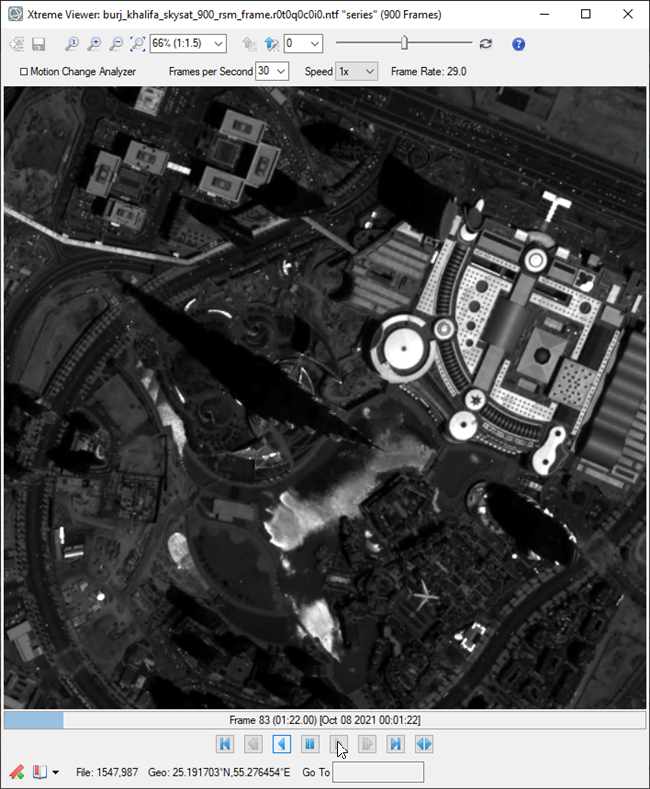
- New Xtreme Viewer for fast animation of MIE4NITF frames
- Added the ability to filter records by attributes
- New Toolbox tools for Decorrelation Stretch, Generate Thumbnail Image, and Regrid Raster
- Added ENVITasks for FindRasters, DecorrelationStretch, GenerateThumbnail, and MergeROI
- Added Methane Index
- Added Multi-select in the Layer Manager and Data Manager
- Improved ENVI API write speed for the BIP interleave
- Added Change Interpolation option to the Layer Manager
- New values added to the MODE keyword
- New ENVINITF::WriteMetadata function method
- Multiple NITF performance improvements
- Changed the Zoom Interpolation Method default preference Optimized Bicubic
- Windows 32-bit support for video read/write has been dropped
Supported Data Types
- Meteosat 2nd generation: Level 1.5
-
Landsat 9
- Collection 2: Level 1 and 2
- Analysis Ready Data
- STANAG 4676 Track Points: Edition B
- SuperView-1: Level-1B and Level-2A multispectral and panchromatic data
Xtreme Viewer for MIE4NITF Frame Animation
The new Xtreme Viewer enables you to animate the frames of a MIE4NITF series at up to 30 Frames Per Second (FPS). With Xtreme Viewer, you can animate the frames in a forward or backward order, change the FPS on-the-fly, step through frames one at a time, bookmark frame views to return to later, and apply a contrast stretch.
Filter Records by Attributes
If a layer has an attribute table, you can filter the records by one or more attributes, save the filtered layer to a new shapefile, and you can save filter settings to a .json file for reuse. See Filter by Attributes for details.
New Tools
These new tools have been added to the ENVI Toolbox:
- Decorrelation Stretch: Removes the high correlation commonly found in multispectral data sets to produce a more colorful color composite image.
- Generate Thumbnail Image: Generate a thumbnail from the given raster and size.
- Regrid Raster: Defines a custom grid to which the raster will be regridded. A custom grid definition provides the information needed to georeference rasters and vectors to a common coordinate system.
New ENVITasks
You can use these new ENVITasks to perform data-processing operations in your own ENVI+IDL programs:
|
Task |
Description |
|---|---|
|
This task searches and opens rasters in a given directory based on a match pattern. |
|
|
This task removes the high correlation commonly found in multispectral data sets to produce a more colorful color composite image. |
|
|
This task generates a thumbnail from the given raster and size. |
|
|
This task performs a union or intersection of multiple ROI geometries into a single output ROI. Note that this task only works with geometry and will ignore ROIs that contain pixels or thresholds in their definitions. |
Methane Index
A new index for detecting methane emissions is available for use with the Spectral Indices tool and API. See Methane Index for details.
Multi-select
Multi-select is now available when there are multiple data layers in the Layer Manager. Press the Ctrl or Shift key as you select the desired layers, then perform actions on those layers at once, such as Hide, Remove, and so on.
Performance Increase for API Write Speed - BIP Interleave
The ENVI API write speed for the BIP interleave has been significantly improved, up to 90% in some cases.
NITF Performance Improvements
NITF performance improvements include the following.
Image display performance improvements:
Display time for a NITF 2.1 JPEG 2000 Compressed Image to the screen is now up to 80% faster.
The time to display a NITF Uncompressed Image to the screen has been improved to be up to 40% faster.
NITF metadata parsing improvements:
The time to parse NITF metadata is now 60% faster.
Change Interpolation
You can change the interpolation method to use on a raster layer or raster series layers. The options are Nearest Neighbor, Bilinear, Bicubic, and Optimized Bicubic.
Programming
MODE Keyword
BSQ, BIL, and BIP are new valid values for the MODE keyword of ENVIRasterIterator and ENVIRaster::CreateTileIterator.
ENVINITF::WriteMetadata
The New ENVINITF::WriteMetadata function method writes NITF metadata to a text file.
Preference Update
The default value for Zoom Interpolation Method (Display General Preferences) has been changed to Optimized Bicubic. The default was previously set to Nearest Neighbor. Optimized Bicubic will produce more natural-looking images when zooming in and out.
Video Support
Windows 32-bit video support for the following has been dropped: Full Motion Video, ENVIView::ChipToVideo, and VideoToRasterSeries Task.