|
<< Click to Display Table of Contents >> Import Data - SAR Spaceborne - TerraSAR-X and Tandem-X |
  
|
|
<< Click to Display Table of Contents >> Import Data - SAR Spaceborne - TerraSAR-X and Tandem-X |
|
Purpose
Standard products, acquired by TerraSAR-X and Tandem-X satellites, are imported into the SARscape Data Format for further processing.
Technical Note
The data data can be provided in two different formats:
•COSAR (.cos), which are marked by the "SSC" (Slant Range) prefix. This is the only format supported for Tandem-X data.
•Tiff, which are marked by "MGD" (Ground Range), "GEC" (Geocoded on the Ellipsoid) or "EEC" (Geocoded using a Digital Elevation Model), prefixes in the "Data Type" selection list.
| Version |
Only for SSC products, one of the auxiliary files (i.e. "GEOREF.xml") is used to extract atmospheric related factors from the "Signal Propagation Effects" section; these factors are automatically considered for the correction of both the Scene Start Time and Slant Range Distance.
TerraSAR-X and Tandem-X data
These data, if acquired in bistatic mode (one satellite sends the signal which is received by both), are typically provided already coregistered. For these data the coregistration step is automatically disabled by checking the special flag in the Preferences.
The original product is provided with 3 different parameter files (.xml):
•TDX...xml > this has not to be entered in the input "Parameter list".
•TSX...xml > this has not to be entered in the input "Parameter list".
•TDM...xml > this has to be entered in the input "Parameter list".
It is important to know that, very often, the full path name of the original product is too long and in such case the import process ends with an error. This problem can be solved by reducing the input path name as illustrated in the following example:
Original product > dims_op_oc_dfd2_369820592_8\TDM.SAR.COSSC\1032760_002\TDM1_SAR__COS_BIST_SM_D_SRA_20110609T083746_20110609T083751
Shortened path > 1032760_002\TDM1_SAR__COS_BIST_SM_D_SRA_20110609T083746_20110609T083751
In any case the original product structure and content of the data folder (1032760_002 in the example above) must not be manually modified. This is true for both TerraSAR-X and Tandem-X products.
When TerraSAR-X and Tandem-X data are acquired in bistatic mode (i.e. interferometric image pair) the imported output products are identified one by the _REFERENCE and one by the _SECONDARY extension. It is important that, once these imported data are processed in interferometric mode, the reference and seconday inputs are entered as indicated by the SARscape extensions.
Supported Products
Product Variant
| SSC | Single Look Slant Range Complex |
| MG | Multi Look Ground Range Detected |
| GEC | Geocoded Ellipsoid Corrected |
| EEC | Enhanced Ellipsoid Corrected |
Image Mode
| HS | Spotlight High Resolution (Slant Range, Ground Range or Geocoded) Single, Dual and Quad Polarization. |
| SC | ScanSAR (Slant Range, Ground Range or Geocoded). |
| SL | Spotlight (Slant Range, Ground Range or Geocoded) Single, Dual and Quad Polarization. |
| SM | Stripmap (Slant Range, Ground Range or Geocoded) Single, Dual and Quad Polarization. |
Note: Tandem-X bistatic data supports only SM products
Note: To perform interferometry with TerraSAR-X ScanSAR data please use the ScanSAR Module.
PLEASE NOTE:
In case of SC SLC import (ScanSAR mode), the Bursts are kept separately inside a new folder (two folder in case of two polarization) with extension ".split_burst_cut" created in the output directory. A _slc_list file is created as well. Please use this file as input for other processing such as interferometry or multilooking.
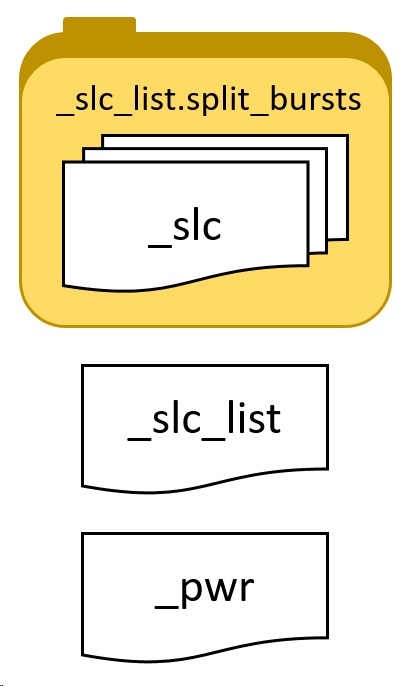
The image below shows a typical folder containing an imported SC SLC acquisition. The actual SLC data is stored divided in bursts inside the .split_bursts directory. For processing, we suggest to use the _slc_list file which is a link to all the single bursts, SARscape is able to read the _slc_list and perform the link to the bursts. It is not possible to open the _slc_list file in ENVI to show the SLC data as this file does not contains data but only a textfile link. Howeverer, it is possible to open the multilooked _pwr data which is created if the "Make Power QL" is set to true in the "other parameters". It is possible to view the file by multilooking it..
To keep the link between the _slc_list file and the bursts, it is mandatory to keep the file structure as it is. _slc_list file (with .sml) and the .split_bursts folder should be moved or copied together. The _slc_list file (with .sml) and the .split_bursts folder must be in the same directory.
In case of Sample Selection is performed after the import, the structure of the output file will remain the same (filename will have the suffix _cut added). To perform sample selection of _slc_list data, please follow the instructions found here.
|
_slc_list.split_bursts This folder, called with the extension "_slc_list.split_bursts", contains all the single bursts which contains the entire acquisition. Each burst has a _slc extension,ENVI header files (.hdr) and SARscape header files (.sml) are included, as well as shapefile (.shp) which allow the user to display the border in geographic coordinates, for instance in ENVI. .kml are also provided for location display purpose. These files can be opened in Google Earth, ArcGIS Earth or similar software.
Please note: No not use these _slc for processing but use rather the _slc_list file which is located outside this folder.
|
_slc_list The _slc_list file is a simple text file which "links" to the different _slc files composing the acquisition which are located inside the "_slc_list.split_bursts" folder. This file is accompanied by a SARscape header file (.sml) which allows the software to recognize the _slc_list as a valid file for processing input. This file can not be opened in ENVI.
|
|
_pwr This file is the result of the mosaic of multilooked bursts. This file can be opened in ENVI and represents the intensity.
|
Further information on TerraSAR-X data are available at: http://www.infoterra.de/tsx/index.php
Further information on Tandem-X data are available at: http://www.dlr.de
Input Files
Input Parameters File list
Input file name(s) of the original Parameter file(s) (.xml). These files are mandatory.
Parameters - Principal Parameters
Apply calibration constant
When this option is selected a calibration constant scaling (Beta nought) is applied. Note: this has no effect of phase values.
Fill dummy during import
Possibility to replace invalid backscatter pixel values with random low values.
Rename Output Using Parameters
If set, only relevant information will be copied from the input name(s) to the output name(s), the full root name otherwise.
Note: the Data Type is automatically detected and selected.
Parameters - Global
It brings to the general section of the Preferences specific parameters. Any modified value will be used and stored for further processing sessions.
Parameters - Other Parameters
It brings to the general section of the Preferences parameters. Any modified value will be used and stored for further processing sessions.
Output Files
Output file list
Output file name(s) of the imported data. These files are mandatory.
Root name of the imported file and associated header files (.sml, .hdr). Specific file suffixes are added according to the data type.
.shp
Shape file and associated header files (.sml, .hdr) containing the image perimeter in geographic co-ordinates.
.kml
ASCII file containing the image perimeter in geographic co-ordinates. Double clicking on this file will automatically position the boundaries of the scene into the Google Earth environment.
Details specific to the Units of Measure and Nomenclature of the output products can be found in the Data Format section.
General Functions
Exec
The processing step is executed.
Store Batch
The processing step is stored in the batch list. The Batch Browser button allows to load the batch processing list.
Close
The window will be closed.
Help
Specific help document section.
Specific Function(s)
None.
Task, SARscapeBatch object, SARscapeBatch script example
References None.