|
<< Click to Display Table of Contents >> General Tools - Sample Selection - Sample Selection (SAR Geometry Data) |
  
|
|
<< Click to Display Table of Contents >> General Tools - Sample Selection - Sample Selection (SAR Geometry Data) |
|
Purpose
This tool allows a spatial subset to be extracted from a single image or from an image stack. Both complex (_slc,_slc_list) and intensity images (_pwr) are supported. This functionality can be used for example to extract a subset from an interferometric stack of Single Look Complex full frames to carry out a time-series analysis on a restricted area of interest. Restricting the data coverage to the area of interest will speed-up the processing.
Technical Note
The first image of an input file list is used as a reference and all the input files are co-registered to the geometry of this reference image, using the satellite orbital and timing information (no refinement based on cross-correlation or coherence maximization is carried out). In case of inaccurate orbits or timing information, the subset selection can be imprecise. The images for which the co-registration process fails are discarded and a warning message is issued.
The spatial subset can be specified in radar coordinates or in geographical coordinates:
1.To specify radar coordinates, the "Geographical Region" flag must be set to false and the first and last column and row numbers of the area to cut out in the reference image must be provided. In case more input files are specified, the "Make Coregistration" flag must be set to true to cut out the same area from each image, since the same row and column numbers will correspond to different points on ground for different acquisition geometries.
2.To specify geographical coordinates, the "Geographical Region" flag must be set to true and geographical coordinates defining the spatial subset to cut out must be either provided directly or through a vector file. The "Make Coregistration" flag can be left to its default value (false), since the conversion from geographical to radar coordinates will be carried out automatically for each acquisition.
In the stacking processing, this tool allows to reduce the data dimension to be ingested in the processing chain, resulting in a speed increasing.
Please Note:
If the De Grandi filtering has to be applied on resampled data, please make sure the "use min and max coordinates" is set to TRUE during the Sample Selection. It is then possible to cut the data without this option on the filtered data.
ScanSAR or TOPSAR _slc_list data
Note: In case of ScanSAR or TOPSAR _slc_list data, please create the shapefile to use or take the slant range coordinates using the _pwr as reference. This file has to be used as reference file.
Note: In case of ScanSAR or TOPSAR _slc_list the resampling will not follow the given coordinates or shape but the whole bursts crossing or inside the selected area are kept. It is possible to give a threshold of pixels inside the selected area to determine if the burst has to be kept in the resampled image. Sampled ScanSAR or TOPSAR SLC will keep their format (_slc_list and .split_burst folder will become cut_slc_list and .split_burst_cut) Please keep all the file hierarchy as given in the output.
Please follow these suggestions when performing sample selection on SLC LIST data in case of use a shapefile in geographic coordinates or slant range coordinates.
Vector file |
Shapefile in geographic coordinates |
Shapefile in slant range coordinates |
DEM file |
Mandatory |
Not needed |
Reference file |
Not needed |
Mandatory (has to be the PWR used as reference to create the shapefile) |
Make coregistration |
False |
True |
Geographical region |
True |
False |
Example of sample selection of a ScanSAR or TOPSAR imported as _slc_list.
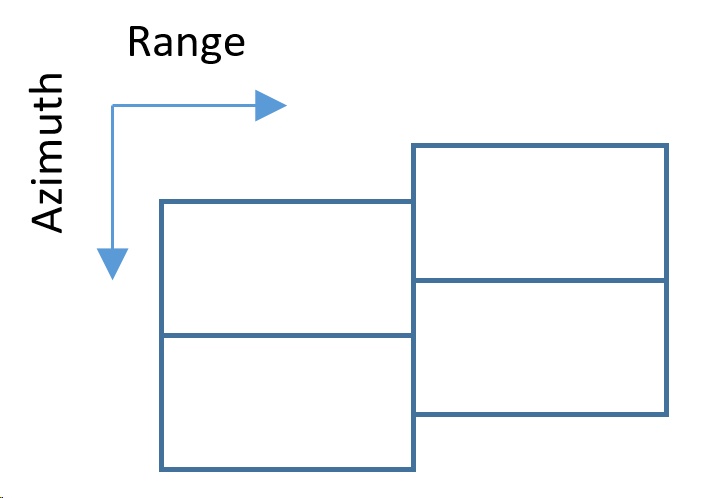
1.The slc is divided into small portions called bursts which are found inside a folder after the import. Outside the folder there is a _slc_list file which makes the connection to the SLC in the folder. Please use the _slc_list file. Depending on the import parameters chosen, also a multilooked PWR file is created. Please check the import chapter for further information. It is not possible to create a shapefile over a _slc_list file because it is only a link to the burst. In this example, the folder will contains 4 slc.
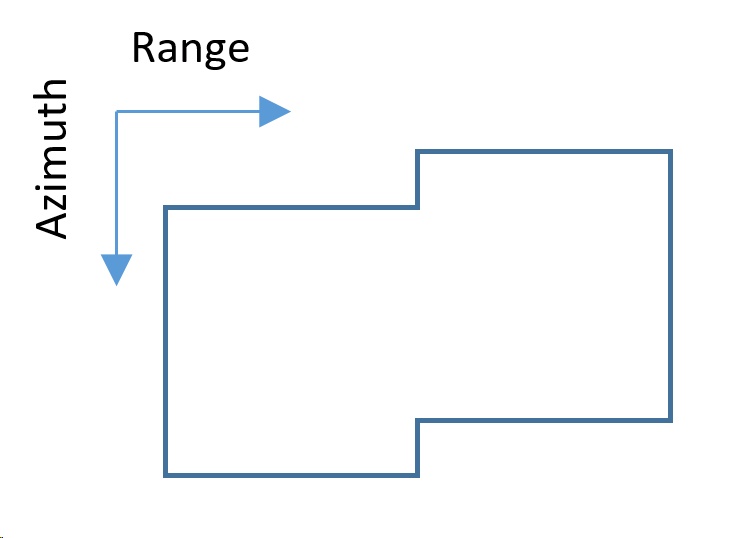
2.The PWR file is a power multilooked image. If the import routine did not created this file, please use the multilooking tool with the _slc_list. This file is in slant range coordinates and has to be used to retrieve cut coordinates or to create a shapefile.
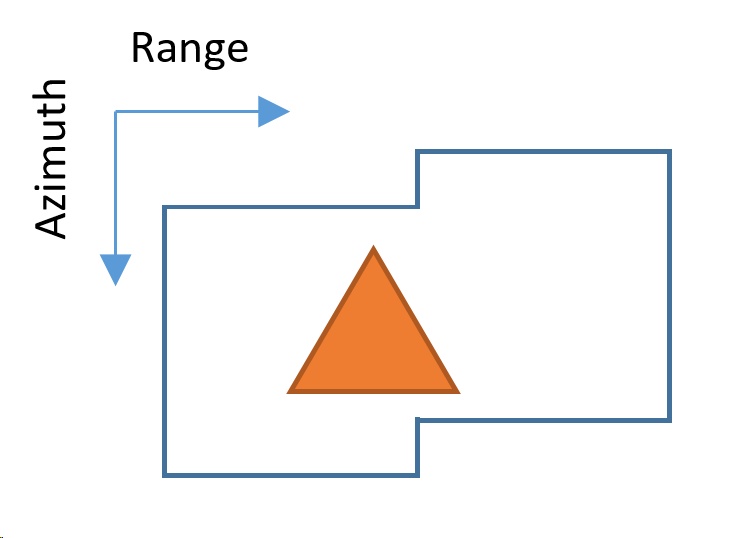
3.Creation of a shapefile. Creating a shapefile over the PWR image automatically saves the shapefile in slant range coordinates as reference. This means that this shapefile can be ingested in the sample selection routines to cut _slc_list files. In this example, the shapefile intersects 3 bursts.
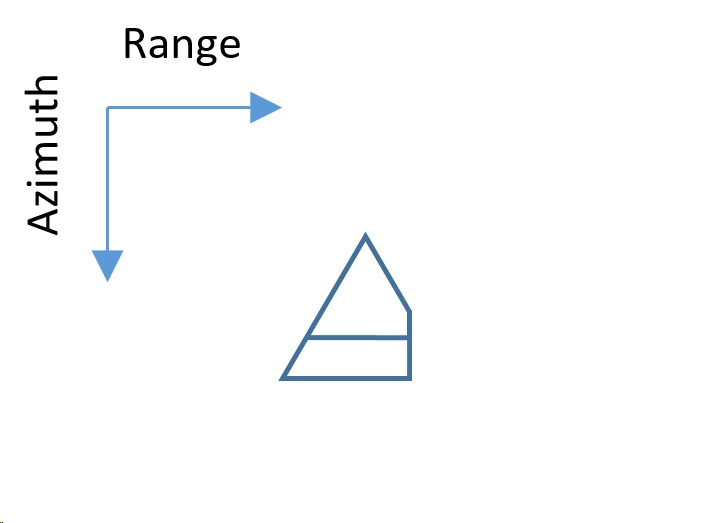
4.To reduce coregistration problems during further processing, the sample selection only keeps the burst parts which are larger than a given dimension, the resulting burst folder will only contain 2 burst. The burst in far range is discarded even if the shapefile intersects it because the resulting surface is smaller than the threshold percentage set in the software (default: 500 Pixels).
|
|
1. Bursts of TOPSAR acquisition (simplified).
|
2. PWR of TOPSAR acquisition. Use this file to retrieve a shapefile in slant range coordinates.
|
|
|
3. Creation of a shapefile corresponding to the area of interest. The shapefile is retrieved over the PWR file in slant range coordinates.
|
4. Result of sample selection. Small bursts are discarded because can lead to coregistration problems. The threshold is set to a square with 500 pixel side. Burst smaller than this threshold in at least one direction (range or azimuth) are discarded. To change this threshold please change the Min Valid Square Dimension value.
|
Note: Please remember to always check the _pwr of the results in order to be sure the image was cut correctly and the eventually skipped burst are not containing needed information.
If the user wants to be sure the bursts containing needed information are not skipped, the following steps can be performed:
1.Geocode a _pwr file of the imported data (if needed, perform a multilooking on the _slc_list in order to generate the _pwr) and display it in ENVI. Otherwhise, any other geocoded image where the area of interest is well displayed can be opened in ENVI.
2.Find the "_slc_list.split_bursts" folder of the _slc_list that has to be cut (in case of several data, please use only one acquisition).
3.Every single _slc inside this folder should contain a .shp file. Select all .shp files and open them in ENVI.
4.A geocoded image containing the area of interest and shapefiles showing the footprint of each single burst are displayed.
5.Create a shapefile trying to include you area of interest and keep at least 10% of surface of each intersected burst.
Input Files
Input file list
Input file name(s) of the data to be processed. This file is mandatory. Files in this list must be in slant range coordinates. For data projected in geographical coordinates please use the proper tool.
Optional Files
Area of Interest
A vector file (.shp) or a Google Earth file (.kml or .kmz) can be entered to specify the area to be processed. In case the area is irregular, the circumscribed rectangular area is considered.
This file is optional. Important note: The area of interest must have at least 3 vertexes inside the area covered by the original image.
DEM File
This file is needed when the sample area is specified in cartographic co-ordinates. This file is optional.
Input Reference File
This file is mandatory in case of SCANSAR or TOPSAR _slc_list are in the input file list. This is needed because the Vector File has to be retrieved on the multilooked _pwr having another geometry than the input files (_slc_list). This _pwr file has to be entered here as reference.
Note: This file is mandatory if:
•the file to resample is a SCANSAR or TOPSAR _slc_list and
•the shapefile used to resample is in slant coordinate or
•the box coordinates to resample are given in slant range coordinates
the Reference file must be the _pwr associated to the _slc_list
Parameters - Principal Parameters
Make Coregistration
By setting this flag the input files will be coregistered with the optional input DEM according to the Preferences parameters.
Coregistration With DEM
By setting this flag the input files will be coregistered with the optional input DEM according to the Preferences parameters.
Geographical Region
By setting this flag the area to be processed is specified in cartographic co-ordinates or georeferenced vector file (referred to the input DEM or Cartographic system); otherwise file co-ordinates (i.e. slant range geometry) must be entered. The selected region is referred to the Reference data. Co-ordinate decimal values must be entered using the dot (e.g. 29.30) and not the comma (e.g. 29,30) character.
| - | West/First column |
The Westernmost cartographic co-ordinate or the first column file co-ordinate.
| - | East/Last column |
The Easternmost cartographic co-ordinate or the last column file co-ordinate.
| - | North/First row |
The Northernmost cartographic co-ordinate or the first row file co-ordinate.
| - | South/Last row |
The Southernmost cartographic co-ordinate or the last row file co-ordinate.
Use Min and Max Coordinates
By setting this flag only the corners provided in the optional vector file will be used to select the data from the input file(s).
Parameters - Global
It brings to the general section of the Preferences parameters. Any modified value will be used and stored for further processing sessions.
Parameters - Cut
Threshold for determining if a burst of a TOPSAR/ScanSAR acquisition has to be kept in the resampled value. If the dimension (in pixels) of a burst inside the selected area is less that this value (in at least one direction: range and azimuth), the whole burst will be discarded. This parameters works only with _slc_list in input (Sentinel TOPSAR, Palsar ScanSAR Full Aperture, TerraSAR-X ScanSAR).
See the Principal Parameters section for the parameters description.
Parameters - Coregistration
It brings to the coregistration section of the Preferences parameters. Any modified value will be used and stored for further processing sessions.
Parameters - Other Parameters
It brings to the general section of the Preferences parameters. Any modified value will be used and stored for further processing sessions.
Output Files
Output file list
Output file name(s) of the extracted data. This file is mandatory.
_cut_[input extension]
Resized data and associated header files (.sml, .hdr). The original extension of the input file is kept at the end of the filename in order to allow recognition of the filetype by SARscape tools in further processing
.xml
Xml file containing the geographic co-ordinates of the scene corners.
.shp
Shape file and associated header files (.sml, .hdr) containing the image perimeter in geographic co-ordinates.
.kml
ASCII file containing the image perimeter in geographic co-ordinates. Double clicking on this file will automatically position the boundaries of the scene into the Google Earth environment.
_orb.sml
Xml file containing the scene orbital parameters. This file is generated only for ASAR_WS products.
Details specific to the Units of Measure and Nomenclature of the output products can be found in the Data Format section.
General Functions
Exec
The processing step is executed.
Store Batch
The processing step is stored in the batch list. The Batch Browser button allows to load the batch processing list.
Close
The window will be closed.
Help
Specific help document section.
Specific Function(s)
None.
References
None.