|
<< Click to Display Table of Contents >> SARscape Batch Object |
  
|
SARscape Batch Object
|
<< Click to Display Table of Contents >> SARscape Batch Object |
|
The SARscape Batch Object has to be used to call any SARscape functionality by means of an IDL script.
This function returns a reference to a SARscapeBatch object. Your code must start the ENVI application in batch mode in order to recognize SARscapeBatch as valid routine, or alternatively you must perform an initialization steps before referencing the object.
SARscapeBatch allows executing any SARscape functionality in batch mode and the definition of all the parameters needed by the SARscape functionality.
Example
This example shows how to initialize a SARscapeBatch object without an ENVI session.
; Step 1) Load the SARscape extension in IDL (Please note: 'C:\Users\username\temp_sarscape' should be an already existing directory)
; SARscape batch initialization and temporary directory setting
temporary_directory = 'C:\Users\username\temp_sarscape'
SARscape_Batch_Init,Temp_Directory=temporary_directory
oSB = obj_new('SARscapeBatch')
help,oSB
; Exit from batch procedure
SARscape_Batch_Exit
oSB = obJ_new('SATscapeBatch',Module=ModuleName)
Methods
Properties
Properties marked as (Get) can be retrieved, but not set.
DESCRIPTION (Get)
A string describing the SARscape module currently handled by the object
HASSCHEMA (Get)
Returns 1 (TRUE) if a schema definition exists for the module, and 0 (FALSE) if not.
MODULE (Get,Set)
A string specifying the name of SARscape module currently handled by the object.
Keywords
MODULE
Set this keyword to a valid module name, one out of the list of available modules as obtained with the MANIFEST method, called after initialized the object without this keyword set.
This method executes the SARscape module that has been defined. Before the executing it performs a sanity check on the parameters defined and after the validation it starts the process.
Example
This example shows how to initialize a SARscapeBatch object and its execution.
; SARscape batch initialization and temporary directory setting
temporary_directory = 'C:\Users\username\temp_sarscape'
SARscape_Batch_Init,Temp_Directory=temporary_directory
oSB = obj_new('SARscapeBatch',Module='ImportCskFormat')
IF (~OBJ_VALID(oSB)) THEN BEGIN
; The object is not valid then the user must manage the error
; Exit from SARscape batch
SARscape_Batch_Exit
return
ENDIF
FileIn = ['MyCosmoScene']
FileOut = ['MyFileout']
ok = oSB.SetParam('input_file_list',FileIn)
ok = oSB.SetParam('output_file_list',FileOut)
oK =oSB.Execute()
Syntax
Result = SARscapeBatch.Execute(WORKING_DIRECTORY=varIn, ERRMSG=varOut)
Return Value
Returns a 1 if successful in executing the module, 0 otherwise
Arguments
None
Keywords
WORKING_DIRECTORY
Set this keyword to a valid directory to supersede the default directory of the temporary folder.
ERRMSG
Set this keyword to a named variable that will contain any error message issued during execution of the SARscape Module. If no error occurs, the ERROR variable will be set to a null string ('').
SARscapeBatch::ExecuteProgress
This method executes the SARscape module that has been defined. Before the executing it performs a sanity check on the parameters defined and after the validation it starts the process. Unlike the method Execute during the process a progress bar is visualized.
Note: The progress bar is visualized only if an ENVI batch session is open.
Example
This example shows how to initialize a SARscapeBatch object and its execution.
; Launch ENVI
e= ENVI()
; Load SARscape extensions
a = sarscape_core_essentials(EXT_ONLY_SARMAP_CORE=1)
oSB = obj_new('SARscapeBatch',Module='ImportCskFormat')
FileIn = ['MyCosmoScene']
FileOut = ['MyFileout']
ok = oSB.SetParam('input_file_list',FileIn)
ok = oSB.SetParam('output_file_list',FileOut)
oK =oSB.ExecuteProgress(ErrMgs=err)
Syntax
Result = SARscapeBatch.Execute(WORKING_DIRECTORY=varIn, ERRMSG=varOut)
Return Value
Returns a 1 if successful in executing the module, 0 otherwise
Arguments
None
Keywords
WORKING_DIRECTORY
Set this keyword to a valid directory to supersede the default directory of the temporary folder.
ERRMSG
Set this keyword to a named variable that will contain any error message issued during execution of the SARscape Module. If no error occurs, the ERROR variable will be set to a null string ('').
The GetParam method retrieves the values of the parameters associated with the selected SARscape module. To print the names and values of each parameters associated with the SARscape module the method ListParams can be used.
Example
This example shows how to retrieve the values of parameters from a SARscape module
; SARscape batch initialization and temporary directory setting
temporary_directory = 'C:\Users\username\temp_sarscape'
SARscape_Batch_Init,Temp_Directory=temporary_directory
oSB = obj_new('SARscapeBatch',Module='BaseMultilooking')
ok = oSB.GetParam('azimuth_multilook',value)
print,value
Syntax
Result = SARscapeBatch.GetParam(NameParam,Value)
Return Value
Returns a 1 if successful, 0 otherwise
Arguments
NAMEPARAM
A scalar string that is a fully-qualified parameter name
VALUE
Name of an IDL variable that will contain the value of the parameter
Output
USER_PARAMETER_TO_FILL indicates that the corresponding parameter value is not initialized from the defaults, and that it shall mandatorily set by the user before executing the module.
USER_OPTIONAL_PARAMETER indicates that the corresponding parameter value is not initialized from the defaults, but it shall not necessarily set by the user before executing the module.
The GetParamType method retrieves the type of the parameters associated with the selected SARscape module. To print the names and values of each parameters associated with the SARscape module the method ListParams can be used. If the type of parameter is an "enumeration" it's possible to print the list of values associated.
Example
This example shows how to retrieve the values of parameters from a SARscape module
; SARscape batch initialization and temporary directory setting
temporary_directory = 'C:\Users\username\temp_sarscape'
SARscape_Batch_Init,Temp_Directory=temporary_directory
oSB = obj_new('SARscapeBatch',Module='INSARFILTERANDCOHERENCE')
oSB.GetParamType('filtering_method',type)
print,type
oSB.GetParamType('filtering_method',type, enum)
print, enum
Syntax
Result = SARscapeBatch.GetParamType(NameParam,Type)
Return Value
Returns a 1 if successful, 0 otherwise
Syntax
Result = SARscapeBatch.GetParamType(NameParam,Type,Enum)
Return Value
Returns a 1 if successful, 0 otherwise
Arguments
NAMEPARAM
A scalar string that is a fully-qualified parameter name
TYPE
Name of an IDL variable that will contain the type of the parameter
ENUM
Type of param containing a list of values.
Output
USER_PARAMETER_TO_FILL indicates that the corresponding parameter value is not initialized from the defaults, and that it shall mandatorily set by the user before executing the module.
USER_OPTIONAL_PARAMETER indicates that the corresponding parameter value is not initialized from the defaults, but it shall not necessarily set by the user before executing the module.
Use the ListParams method to print the parameters and their values defined for a module
Example
This example shows how to print the names and values of parameters.
; SARscape batch initialization and temporary directory setting
temporary_directory = 'C:\Users\username\temp_sarscape'
SARscape_Batch_Init,Temp_Directory=temporary_directory
oSB = obj_new('SARscapeBatch',Module='BaseMultilooking')
oSB.ListParams
GENERAL_PARAMETERS_CMD
doppler_rg_poly_degree: 4.0000000
doppler_az_poly_degree: 2.0000000
doppler_az_poly_number: 20.000000
…
MAIN_BASIC_MULTILOOKING
sarscapeenvironment: IDL_ENVI_ENV
input_file_list: USER_PARAMETER_TO_FILL
output_file_list: USER_PARAMETER_TO_FILL
range_multilook: 1.0000000
azimuth_multilook: 1.0000000
output_root_name: Optional...
cut_dummy_min_pixel: -1.0000000
grid_size_for_suggested_looks: 1.5000000
fill_dummy_flag: OK
fill_dummy_method: mean_near_pixels
rows_window_number: 0.00000000
cols_window_number: 0.00000000
Syntax
SARscapeBatch.ListParams
Arguments
None
Output
USER_PARAMETER_TO_FILL indicates that the corresponding parameter value is not initialized from the defaults, and that it shall mandatorily set by the user before executing the module.
USER_OPTIONAL_PARAMETER indicates that the corresponding parameter value is not initialized from the defaults, but it shall not necessarily set by the user before executing the module.
Use the Manifest method to list all the names of the SARscape modules available and a brief description.
Example
This example shows how to list all the names of the SARscape modules.
; SARscape batch initialization and temporary directory setting
temporary_directory = 'C:\Users\username\temp_sarscape'
SARscape_Batch_Init,Temp_Directory=temporary_directory
oSB = obj_new('SARscapeBatch')
oSB.ob
------------------------------------------------------------------------------------------
Description of the modules available for SARscape Batch
------------------------------------------------------------------------------------------
Module Name..: BASEMULTILOOKING
Description..: BaseMultilooking
******************************************************************************************
Module Name..: BASICCOREGISTRATION
Description..: Coregistration
******************************************************************************************
Module Name..: BASICFECOEFFOFVAR
Description..: Coefficient of Variation
******************************************************************************************
Module Name..: BASICFECOHERENCE
Description..: Coherence Generation
******************************************************************************************
Module Name..: BASICFEMULTITEMPORALFEATURES
Description..: Multitemporal Features
******************************************************************************************
Module Name..: BASICFERATIO
Description..: Ratio
……………
Syntax
SARscapeBatch.Manifest,/FULL,SEARCH=SEED
Arguments
None
Keywords
FULL
Set this keyword to list also the xml Schema name associated with each module.
SEED
A scalar string that contains the seed research
This method allows searching for the name of a specific module.
Example
This example shows how to search for the modules that execute the multilooking functionality.
; SARscape batch initialization and temporary directory setting
temporary_directory = 'C:\Users\username\temp_sarscape'
SARscape_Batch_Init,Temp_Directory=temporary_directory
oSB = obj_new('SARscapeBatch')
oSB.SearchModule,'Multilooking'
------------------------------------------------------------------------------------------
Description of the modules available for SARscape Batch
seed: "Multilooking"
------------------------------------------------------------------------------------------
Module Name..: BASEMULTILOOKING
Description..: BaseMultilooking
******************************************************************************************
Module Name..: INSARCOMPLEXDATAMULTILOOKING
Description..: Complex Data Multilooking
******************************************************************************************
ok = oSB.SetUpModule(Module='BASEMULTILOOKING')
Syntax
SARscapeBatch.SearchModule,SEED
Arguments
SEED
A scalar string that contains the seed research
The SetParam method enables the assignment of values at parameters associated with the selected SARscape module.
Example
This example shows how to search for the modules that execute the multilooking functionality and defines some parameters
; SARscape batch initialization and temporary directory setting
temporary_directory = 'C:\Users\username\temp_sarscape'
SARscape_Batch_Init,Temp_Directory=temporary_directory
oSB = obj_new('SARscapeBatch',Module='BASEMULTILOOKING')
oSB.ListParams
MAIN_BASIC_MULTILOOKING
sarscapeenvironment: IDL_ENVI_ENV
input_file_list: USER_PARAMETER_TO_FILL
output_file_list: USER_PARAMETER_TO_FILL
azimuth_multilook: 5.0000000
range_multilook: 1.0000000
output_root_name: USER_OPTIONAL_PARAMETER
cut_dummy_min_pixel: -1.0000000
grid_size_for_suggested_looks: -1.0000000
delete_temporary_files: OK
make_tiff: NotOK
saturation_default: 0.33330000
ok = oSB.SetParam('azimuth_multilook','4.0')
ok = oSB.SetParam('range_multilook,'2.0')
ok = oSB.SetParam('input_file_list','c:\temp\SARData')
oSB.ListParams
MAIN_BASIC_MULTILOOKING
sarscapeenvironment: IDL_ENVI_ENV
input_file_list (001): c:\temp\SARdata
output_file_list: USER_PARAMETER_TO_FILL
azimuth_multilook: 4.0000000
range_multilook: 2.0000000
output_root_name: USER_OPTIONAL_PARAMETER
cut_dummy_min_pixel: -1.0000000
grid_size_for_suggested_looks: -1.0000000
delete_temporary_files: OK
make_tiff: NotOK
saturation_default: 0.33330000
ok = oSB.Setparam('input_file_list',['c:\temp\SARdata1','c:\temp\SARdata2'])
oSB.ListParams
MAIN_BASIC_MULTILOOKING
sarscapeenvironment: IDL_ENVI_ENV
input_file_list (001): c:\temp\SARdata1
input_file_list (002): c:\temp\SARdata2
output_file_list: USER_PARAMETER_TO_FILL
azimuth_multilook: 4.0000000
range_multilook: 2.0000000
output_root_name: USER_OPTIONAL_PARAMETER
cut_dummy_min_pixel: -1.0000000
grid_size_for_suggested_looks: -1.0000000
delete_temporary_files: OK
make_tiff: NotOK
saturation_default: 0.33330000
Syntax
Result = SARscapeBatch.SetParam(NameParam,Value)
Return Value
Returns a 1 if successful, 0 otherwise
Arguments
NAMEPARAM
A scalar string that is a fully-qualified parameter name
VALUE
A scalar string or an array of strings.
Note: Array of strings can be assigned only to the parameters containing the string “list” inside the name.
The method SetUpModule allows selecting the SARscape module that needs to be executed.
Example
This example shows to select the module that performs the geocoding.
; SARscape batch initialization and temporary directory setting
temporary_directory = 'C:\Users\username\temp_sarscape'
SARscape_Batch_Init,Temp_Directory=temporary_directory
oSB = obj_new('SARscapeBatch',Module='BASICGEOCODING')
Syntax
Result = SARscapeBatch.SetUpModule(Module=ModuleName)
Return Value
Returns a 1 if successful, 0 otherwise
Arguments
None
Keywords
MODULE
A scalar string with the name of a valid SARscape Module.
The VerifyParams method verifies that all the mandatory parameters are filled and in case some parameters have not been filled it sends a notification. This method is also used by the methods Execute and ExecuteProgress before the start of the computational process.
Example
This example shows how to use the method VerifyParams.
This example shows how to use the method VerifyParams.
; SARscape batch initialization and temporary directory setting
temporary_directory = 'C:\Users\username\temp_sarscape'
SARscape_Batch_Init,Temp_Directory=temporary_directory
oSB = obj_new('SARscapeBatch',Module='BASEMULTILOOKING')
ok = oSB.SetParam('azimuth_multilook','4.0')
ok = oSB.SetParam('range_multilook','2.0')
ok = oSB.SetParam('input_file_list','c:\temp\SARData')
ok = oSB.VerifyParams()
Parameter: ***OUTPUT_FILE_LIST*** needs to be filled before exec
Optional Parameter: ***OUTPUT_ROOT_NAME*** not filled
ok = oSB.SetParam('input_file_list','c:\temp\SARData')
ok = oSB.SetParam('output_file_list','c:\temp\OutData')
ok = oSB.VerifyParams()
Print,ok
1
Syntax
Result = SARscapeBatch.VerifyParams(/Silent,/Optional)
Return Value
Returns a 1 if successful, 0 otherwise
Arguments
None
Keywords
SILENT
The keyword disables the print of messages
OPTIONAL
The keyword enables the control also on optional parameters.
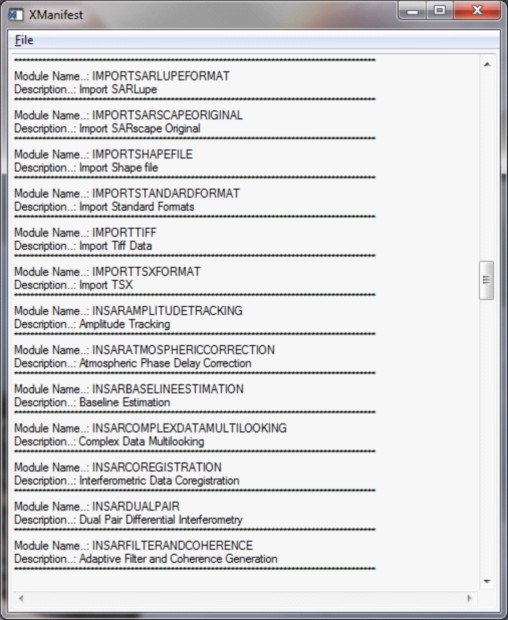
Use the xManifest method to list all the names of the SARscape modules available in a GUI.
Example
This example shows how to list all the names of the SARscape modules.
; SARscape batch initialization and temporary directory setting
temporary_directory = 'C:\Users\username\temp_sarscape'
SARscape_Batch_Init,Temp_Directory=temporary_directory
oSB = obj_new('SARscapeBatch')
oSB.xManifest
Syntax
SARscapeBatch.xManifest,/FULL,SEARCH=SEED
Arguments
None
Keywords
FULL
Set this keyword to list also the xml Schema name associated with each module.
SEED
A scalar string that contains the seed research