|
<< Click to Display Table of Contents >> Import Data - Sentinel Auxiliary Files Download |
  
|
|
<< Click to Display Table of Contents >> Import Data - Sentinel Auxiliary Files Download |
|
Purpose
This tool allows users to download/update the local repository of Sentinel Auxiliary files (precise orbit, restituted orbit and instrument auxiliary data).
For the instrument auxiliary data and for precise orbits, the entire collection is stored. Restituted orbits only cover the last 25 days as they are replaced by precise orbits. After each update of S1 auxiliary data, restituted orbits older than 25 days are automatically replaced.
Technical Note
This tool performs a search for Sentinel Auxiliary files on the Sentinel-1 Quality Control website (https://dataspace.copernicus.eu/browser/) and allows the user to keep the repository up to date.
Please note: The Sentinel Directory has to be previously set in the preferences.
Sentinel-1 auxiliary file directory has to be organized as specified here, to guarantee the correct use of focusing and orbital files during the focusing and import of Sentinel-1 data level-0 or the import of Sentinel-1 data level-1:
Sub directory 'AUX_CAL'
Must contain CAL files required only to focus raw data (level-0)
Sub directory 'AUX_INS'
Must contain INS files required only to focus raw data (level-0)
Sub directory 'AUX_POEORB'
Must contain POD Precise Orbit Ephemerides files (https://dataspace.copernicus.eu/browser/)
Sub directory 'AUX_RESORB'
Must contain POD Restituted Orbit (https://dataspace.copernicus.eu/browser/)
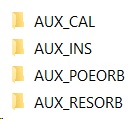
Please note: The first time the Auxiliary Data folder is populated the whole operation can take a long time as several GBs of data must be downloaded. Please make sure you have enough disk space: as of today (December 2023), the dimension of the repository is more than 40 GB.
If the user set a time interval, the AUX_POEORB folder will be filled with the POD Orbit Ephemerides files relevant to the defined time interval.
Please note: The Pop-Up that appears after executing this process and saying "End" is not referred to the end of the download process. A separate window is opened where the files are downloaded. When the Pop-Up "End" appears, it is possible to continue to use ENVI and SARscape as this process is not blocking. During the download process it is possible to close ENVI: the downloading window will stay open and continue the data acquisition.
Input Parameter(s)
Download type
This parameter allows choosing the activity that has to be performed.
Incremental
All the files between the latest file already present in the local repository and the latest present on the online repository (https://dataspace.copernicus.eu/browser/) are downloaded.
Full
A search in all pages of the online repository is performed. Data already downloaded will be checked and, if the dimension matches, skipped. Missing or corrupted files will be downloaded and stored, updating the local repository.
From
Sensing period start date (day-MONTH-year), dd-MMM-yyyy, (01-JAN-1970).
To
Sensing period stop date (day-MONTH-year), dd-MMM-yyyy, (01-JAN-1970). In case the end date is not defined by users, the current time of the processing is considered.
Wait for Completion
If set to False, the DOS window will be automatically closed at the end of the process, otherwise the user need to press Enter to close it.
General Functions
Exec
The processing step is executed.
Store Batch
The processing step is stored in the batch list. The Batch Browser button allows to load the batch processing list.
Close
The window will be closed.
Help
Specific help document section.
Specific Function(s)
None.
Task, SARscapeBatch object, SARscapeBatch script example
References None.