|
<< Click to Display Table of Contents >> Polarimetry and PolInSAR - Polarimetry - Polarimetric Synthesis |
  
|
|
<< Click to Display Table of Contents >> Polarimetry and PolInSAR - Polarimetry - Polarimetric Synthesis |
|
Purpose
Knowledge of the scattering matrix - i.e. the 2x2 complex elements, where the diagonal elements are the co-polar (HH, VV) terms, while the off-diagonal are known as cross-polar (HV, VH) terms - permits the estimation of the received power for any possible combination of transmitting and receiving antennas (i.e. polarization synthesis or formation of the scattering matrix in any arbitrary polarization basis). Starting from a set of full-polarimetric linearly-polarized Single Look Complex (SLC) data, this functionality allows to synthesize a new set of SLC data in a desired orthogonal basis, either circular, linear rotated of 45° or generic elliptical of user-defined orientation and ellipticity.
Technical Note
Ellipticity (-45° to +45°) describes the flatness of the locus of the electric vector of a fully polarized wave, while orientation (-90° to +90°) is the angle between the major axis of the ellipse and a reference direction.
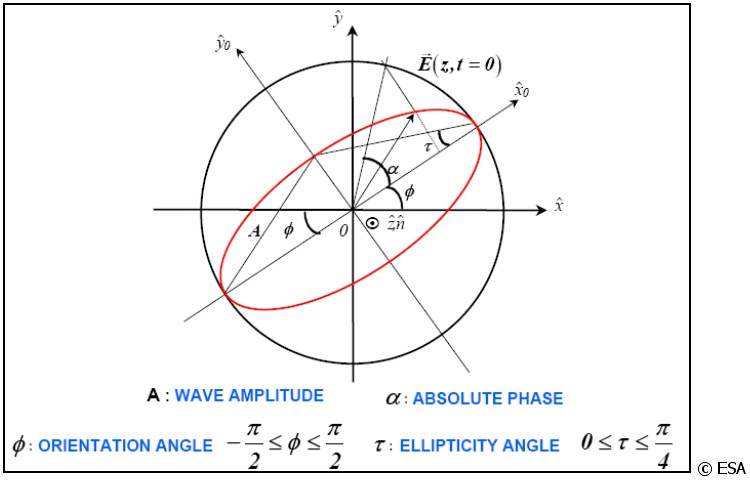
Note that an elliptical polarization becomes a linear one in case of ellipticity angle equal to 0, while an ellipticity angle of + or - 45 degrees corresponds to a circularly-polarized wave.
The sense of rotation of the tip of the wave in the plane of polarization is called the sense of polarization, or handedness. This sense is called right-handed (left-handed) if the direction of rotation is clockwise (counterclockwise for an observer looking in the direction of propagation).
Input Files
Input HH File
Input file names of the scattering matrix (_slc). This file is mandatory.
Input HV File
Input file names of the scattering matrix (_slc). This file is mandatory.
Input VH File
Input file names of the scattering matrix (_slc). This file is mandatory.
Input VV File
Input file names of the scattering matrix (_slc). This file is mandatory.
Parameters - Principal Parameters
Polarisation Type
One of the following parameter must selected:
•Circular
i.e. α = π/2 and Ax = Ay.
•Linear 45°
i.e. α = 0 with slope tan-1(Ay / Ax).
•Elliptical
i.e. α, Ax, Ay not equal to 0.
Orientation
Orientation angle (in degrees).
Ellipticity
Ellipticity angle (in degrees).
Parameters - Global
It brings to the general section of the Preferences parameters. Any modified value will be used and stored for further processing sessions.
Parameters - Other Parameters
It brings to the general section of the Preferences parameters. Any modified value will be used and stored for further processing sessions.
Output Files
Output root name
Root file name. This file is mandatory.
_ll_slc
Circular (left-left) synthetic polarization with the associated header files (.sml, .hdr).
_lr_slc
Circular (left-right) synthetic polarization with the associated header files (.sml, .hdr).
_rl_slc
Circular (right-left) synthetic polarization with the associated header files (.sml, .hdr).
_rr_slc
Circular (right-right) synthetic polarization with the associated header files (.sml, .hdr).
_xx_slc
Linear (45° horizontal - 45° horizontal) synthetic polarization with the associated header files (.sml, .hdr).
_xy_slc
Linear (45° horizontal - 45° vertical) synthetic polarization with the associated header files (.sml, .hdr).
_yx_slc
Linear (45° vertical - 45° horizontal) synthetic polarization with the associated header files (.sml, .hdr).
_yy_slc
Linear (45° vertical - 45° vertical) synthetic polarization with the associated header files (.sml, .hdr).
_00_slc and _11_slc
Elliptical synthetic co-polarizations with the associated header files (.sml, .hdr).
_01_slc and _10_slc
Elliptical synthetic cross-polarizations with the associated header files (.sml, .hdr).
Details specific to the Units of Measure and Nomenclature of the output products can be found in the Data Format section.
General Functions
Exec
The processing step is executed.
Store Batch
The processing step is stored in the batch list. The Batch Browser button allows to load the batch processing list.
Close
The window will be closed.
Help
Specific help document section.
Specific Function(s)
None.
Task, SARscapeBatch object, SARscapeBatch script example
References ESA, Polarimetric SAR Interferometry tutorial