|
<< Click to Display Table of Contents >> Interferometric Stacking - Post Processing Tools - Skew Estimation |
  
|
Interferometric Stacking - Post Processing Tools - Skew Estimation
|
<< Click to Display Table of Contents >> Interferometric Stacking - Post Processing Tools - Skew Estimation |
|
Purpose
This tool is used to compute the angular distortion on the input velocities.
Technical Note
The tool analyzes the velocities given a radius defined by the user.
The resulting value is computed with the following formula:

Where Adv is the differential settlement on the velocities and l corresponds to the radius.
The resulting value, named Angular distortion (β), is then classified according to the user defined thresholds.
Notes:
•The input file must be a vertical decomposed displacement layer;
•The angular distortion can be computed on an attribute at choice and not only on the default velocity field; to do this, edit the "Shape value field name" located under "Other Parameters."
Input Files
Input Shape Files
The accepted file formats are: Shape file (.shp), SARscape raster format or geodatabase (.gdb).
If the input file is a gdb, it is necessasry to select the ''gdb'' file inside the .gdb folder.
This file is mandatory, the shape and gdb files must contain only point features.
Parameters - Principal Parameters
Radius (m)
Radius size expressed in meters of the moving window centered on every point features.
Low risk class threshold
The threshold for the low risk category. The default value is 0.00033 (1/3000, reference: https://www.sciencedirect.com/science/article/abs/pii/S0034425720305344 ).
Medium risk class threshold
The threshold for the medium risk category. The default value is 0.00066 (1/1500, reference: https://www.sciencedirect.com/science/article/abs/pii/S0034425720305344 ).
High risk class threshold
The threshold for the high risk category. The default value is 0.002 (1/500, reference: https://www.sciencedirect.com/science/article/abs/pii/S0034425720305344 ).
Min number of points in the window
The minimum number of points that have to be included in the radius for the skew to be calculated (min. 3). The higher this number the more precise the value; sparse points may be discarded in case this threshold is not satisfied.
Note: The output file will have four risk category classes: β<0.00033, 0.00033<β<0,00066, 0.00066<β<0.002, 0,002<β
Parameters - Global
It brings to the general section of the Preferences parameters. Any modified value will be used and stored for further processing sessions.
Parameters - Other Parameters
It brings to the general section of the Preferences parameters. Any modified value will be used and stored for further processing sessions.
Output Files
Output Root Name
Name of the output root. This file is mandatory.
Field description of the generated shape file:
▪x, y, z: coordinates of the point feature, in the same cartographic system of the input file
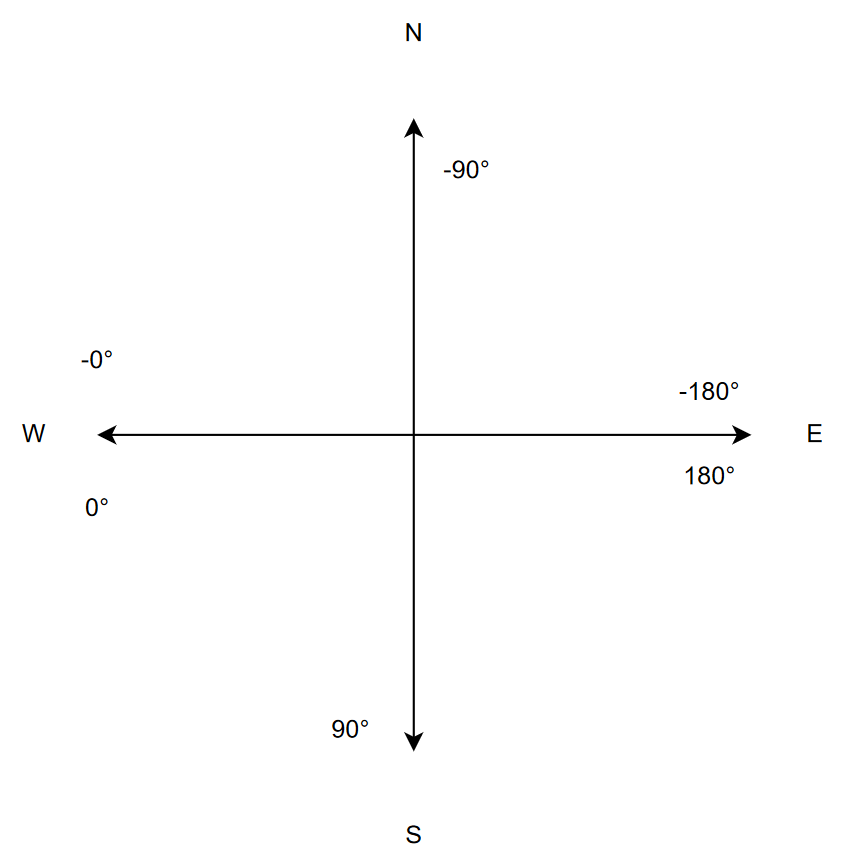
▪vel_x_comp: Velocity component of the variation along the x axis (East-west direction)
▪vel_y_comp: Velocity component of the variation along the y axis (North-south direction)
▪angle_degr: Direction expressed in degrees of the steepest descent, calculated through the atan2 (y/x)
▪beta: Angular distortion value
▪class: Risk category class
The same fields are created for the gdb file.
The raster output divides the fields into separate files.
General Functions
Exec
The processing step is executed.
Store Batch
The processing step is stored in the batch list. The Batch Browser button allows to load the batch processing list.
Close
The window will be closed.
Help
Specific help document section.
Specific Function(s)
None.
Task, SARscapeBatch object, SARscapeBatch script example
References Cigna F., Tapete D., https://www.sciencedirect.com/science/article/abs/pii/S0034425720305344, Remote Sensing of Environment Volume 253, February 2021, 112161.