|
<< Click to Display Table of Contents >> Basic Module - Feature Extraction - Activity Index |
  
|
|
<< Click to Display Table of Contents >> Basic Module - Feature Extraction - Activity Index |
|
Purpose
This tool allows the user to create various indexes to analyze changes in activity between various images on the same area. It is possible to analyze the whole image or only a part of it through the inclusion of a polygon shape file containing one or more areas to analyze.
Technical Note
The created occupational indexes will have the same dates as the input files, while all the other indexes will have the mean date between the two images analyzed.
The components of the two Activity indicators are schematically introduced in the table below, where the entire Area of Interest (AOI) is presented as a number of pixels (later expressed as ∑) divided in four classes, depending on the backscatter coefficient (σ0) differences between the two images:
|
σ0 image 2 |
σ0 image 2 |
σ0 image 1 |
Low-Low |
Low-High |
σ0 image 1 |
High-Low |
High-High |
σ0 corresponds to the calibrated backscatter coefficient.
The Activity indicators are defined by the following equations, where the number of the positive change (Low-High or LH) and the negative change (High-Low or HL) pixels are divided to the total sum of pixels:


The Negative Change indicator, ActivityL, refers to the number of pixels for which the backscatter value decreased below a given threshold, named background threshold, by at least a given threshold for the difference of the backscatter coefficients between the first and the second date. Conversely, the Positive Change indicator, ActivityH, refers to the number of pixels for which the backscatter value increased above the background threshold by at least the given threshold for the difference of the backscatter coefficients between the first and the second date (see the scheme below).
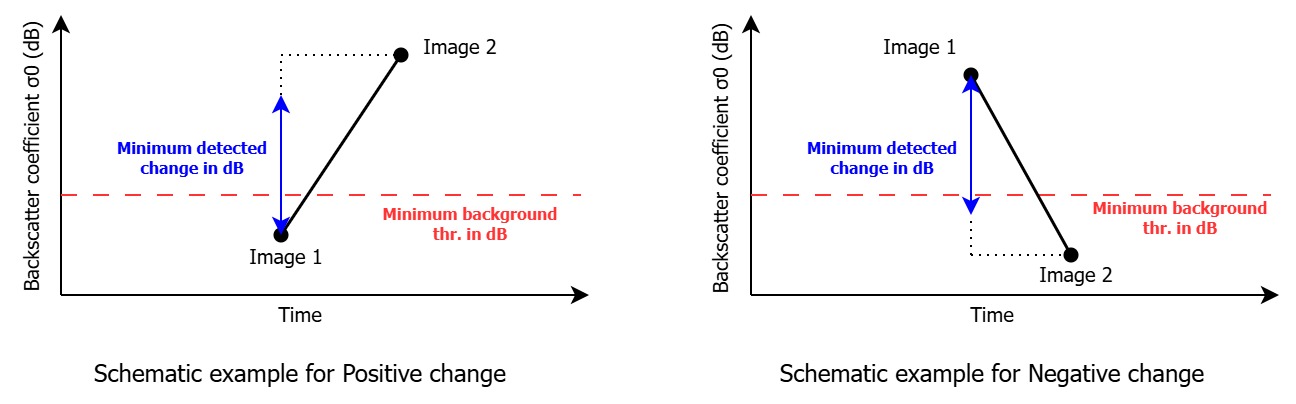
To speed up the process, the input shape file is converted to a raster. For this reason some pixels on the edge of the shape area might be lost. It is therefore recommended to make the shape area a little bigger than the one needed to account for this area.
The requirements regarding the input datastack are as follows:
•The input images must cover the same exact AOI. Therefore, it is important to use the same AOI to Import the images, so that the covered area is exactly the same. Alternatively it is possible to apply the Sample selection tool after the import of the images.
•The datastack must be coregistered since the analysis is performed pixel by pixel.
•The datastack must be geocoded.
The process will order the the image list by date, hence it is not mandatory to input the images in the correct order.
Input Files
Area of Interest in Geographic coordinates
The shapefile containing the area(s) to analyze. This file is optional.
Input file list
The list of geocoded images to analyze. This file is mandatory.
Principal Parameters
Minimum background thr. in dB
This is the minimum dB value (threshold) that will be used to detect a change.
Minimum occupation thr. in dB
This is the minimum threshold in dB to classify pixels as a target.
Minimum detected change in dB
This is the minimum difference that must be present for the change to be detected, setting a value too high means that some changes might be lost, while setting it too low will introduce noise.
Treat all polygons as a single one
By setting this value to True, all the polygons present in the shape file will be considered as one instead of singularly.
Generate Occupation Index
By setting this value to True, the occupation index will be generated.
Generate Positive Index
By setting this value to True, the positive index will be generated.
Generate Negative Index
By setting this value to True, the negative index will be generated.
Generate Total Index
By setting this value to True, the total index will be generated.
Generate Normalized Positive Index
By setting this value to True, the normalized positive index will be generated.
Generate Normalized Negative Index
By setting this value to True, the normalized negative index will be generated.
Generate Normalized Total Index
By setting this value to True, the normalized total index will be generated.
Generate Occupation Counter
By setting this value to True, the occupation index will be generated.
Generate Normalized Occupation Counter
By setting this value to True, the normalized occupation index will be generated.
Date String Prefix in dbf file
Select the prefix to use for the dates in the resulting dbf file(s).
Output Root Name
The root name of the output(s).
Output Files
The output is a list of shape files containing a possible multipoint centered in the middle of the analyzed area(s), with the file name corresponding to the calculated index.
Rootname_occupation
This file will contain a value for every date, for every area. This value will be 1 if the average value of all the pixels in the area for that date is above the Minimum occupation thr. in dB. Otherwise, the value will be 0.
Rootname_positive_change
This file will contain a value for every mean date, for every area. The value will correspond to the number of pixels within the selected area(s) that changed by at least the Minimum detected change in dB between the first and second date. The value will be calculated only in case the area from from the first image has backscatter coefficient below the Minimum background thr. in dB and the one of the second image is above this threshold.
Rootname_negative_change
This file will contain a value for every mean date, for every area. The value will correspond to the number of pixels within the selected area(s) that changed by at least the Minimum detected change in dB between the first and second date. The value will be calculated only in case the area from from the first image has backscatter coefficient above the Minimum background thr. in dB and the one of the second image is below this threshold.
Rootname_total_change
This file will contain a value for every mean date, for every area. The value will correspond to the total number of pixels within the selected area(s) that changed by at least the Minimum detected change in dB between the first and second date. This value is the sum of the positive and negative changes.
Rootname_normalized_positive_change
This file will contain a value for every mean date, for every area. The value will correspond to the percentage of pixels within the selected area(s) that changed by at least the Minimum detected change in dB between the first and second date. The value will be calculated only in case the area from from the first image has backscatter coefficient below the Minimum background thr. in dB and the one of the second image is above this threshold.
Rootname_normalized_negative_change
This file will contain a value for every mean date, for every area. The value will correspond to the percentage of pixels within the selected area(s) that changed by at least the Minimum detected change in dB between the first and second date. The value will be calculated only in case the area from from the first image has backscatter coefficient above the Minimum background thr. in dB and the one of the second image is below this threshold.
Rootname_normalized_total_change
This file will contain a value for every mean date, for every area. The value will correspond to the total percentage of pixels that changed by at least the Minimum detected change in dB between the first and second date. This value is the sum of the normalized positive and normalized negative changes.
Rootname_occupation_counter
This file will contain a value for every date, for every area. The value will be equal to the number of pixels that are above the Minimum occupation thr. in dB for the corresponding date.
Rootname_normalized_occupation_counter
This file will contain a value for every date, for every area. The value will equal to the percentage of pixels that are above the Minimum occupation thr. in dB for the corresponding date.
Rootname_mask
This file will contain the raster representation of the input shape file. The file can be used to identify which shape area corresponds to which record.
Specific Function(s)
None.
Task, SARscapeBatch object, SARscapeBatch script example
References None.