What's New in ENVI 5.7
This release includes the following new and improved features.
Highlights
- New licensing engine
- Additional support for data types
- Additional support for SAR data
- Updated FLAASH module
- New Change Detection Workflow
- New and updated ENVI Toolbox tools
- New Interactive Viewshed Analysis
- New menu and manipulator options
- New ENVITasks
- NITF updates
- New ArcGIS Pro integration
- Publish rasters to ENVI Connect
- New model examples for the ENVI Modeler
- New programming routine
- Removed support for 32-bit ENVI
New Licensing Engine
This version includes a new licensing engine. The same activation codes you used to activate your previous version of ENVI can also be used to activate your new license. If you still have your legacy license installed, the License Administrator will be able to detect it and migrate your license.
Supported Data Types
The following have been added to this release:
-
Support for reading vectors from GeoJSON files
-
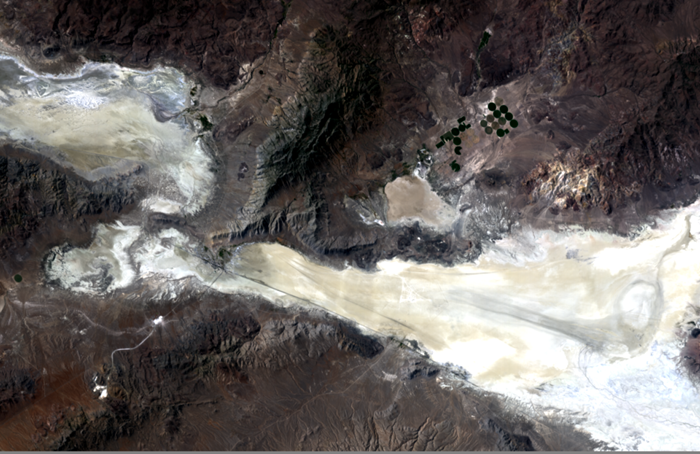
Support for EMIT (Level 1B, Level 2A) hyperspectral imagery
SAR Data Support
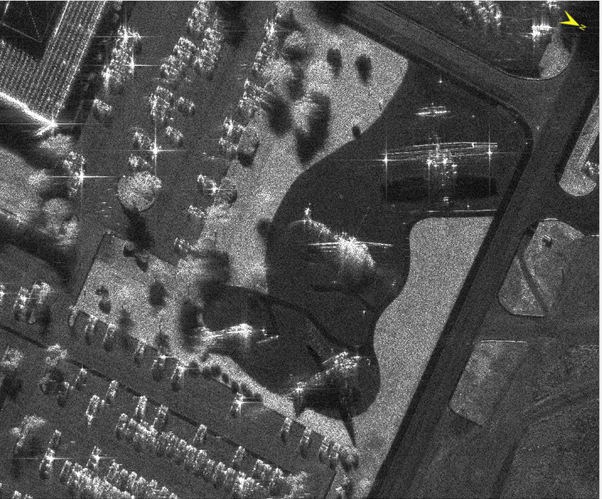
This release includes support for native display of SICD NITF SAR data.
Updated FLAASH Module
The Fast Line-of-sight Atmospheric Analysis of Hypercubes module has significant updates and new features, including:
-
Updated to use MODTRAN 6, which includes:
-
New Line-By-Line (LBL) algorithm that computes transmittance and radiance at shorter wavelength resolution for greater precision
-
Updated DISORT algorithm for more precision on oblique methods and lower sun elevations
-
-
New advanced aerosol options that enable trying different parameters to determine which produce more accurate results
-
New cloud output raster option
-
New ability to create a water map that displays the amount of water vapor within each pixel
-
Updated to automatically correct images if not in radiance (radiometric correction no longer needed before opening imagery in FLAASH)
-
New FLAASH task to enable batch processing in the ENVI Modeler and the API
-
New FLAASH dialog, which includes:
-
Fewer parameters to set
-
Available metadata is extracted from the input raster to automatically populate corresponding parameters
-
The ability to save dialog settings to a text file and use them in future FLAASH sessions
-
For details, see Fast Line-of-sight Atmospheric Analysis of Hypercubes (FLAASH®) and FLAASH Task.
The previous version of FLAASH will continue to be available in ENVI Classic.
New Change Detection Workflow
The new Change Detection Workflow identifies, describes, and quantifies differences between images taken of the same scene at different times or under different conditions.
The features in the new Change Detection Workflow replace these tools, which have been removed from the ENVI Toolbox:
-
Change Detection Difference Map
-
Image Change Workflow
-
SPEAR Change Detection
-
THOR Change Detection
New and Updated ENVI Toolbox Tools
These tools have been updated to use new ENVITasks:
-
Emissivity From Alpha Residuals: Produces alpha residual spectra that approximates the shape of emissivity spectra from thermal infrared radiance data.
-
Emissivity From Normalization: Calculates the emissivity and temperature values from thermal infrared radiance data using a fixed emissivity value.
-
Emissivity From Reference Channel: Calculates emissivity and temperature values from thermal infrared radiance data. This method assumes that all the pixels in one band of the thermal infrared data have a constant emissivity.
-
Relative Water Depth Tool: Calculates a product depicting relative water depths for water regions from a multispectral raster with at least blue, green, and near infrared bands.
-
Thermal Atmospheric Correction: Calculates the thermal infrared atmospheric correction.
The following tools have been removed from the ENVI Toolbox. Their functions have been replaced by the new tools described above:
-
SPEAR Google Earth Bridge
-
SPEAR Pan Sharpening
-
SPEAR Relative Water Depth
-
THOR Zero Band
-
THOR Zero Pixels
New Interactive Viewshed Analysis
The interactive Viewshed Analysis tool has replaced the old Viewshed Analysis workflow tool. Interactive Viewshed Analysis enables you to quickly calculate viewshed without needing to use a multi-step workflow dialog to generate results. Interactive Viewshed Analysis also enables you to perform route analysis and line-of sight analysis.
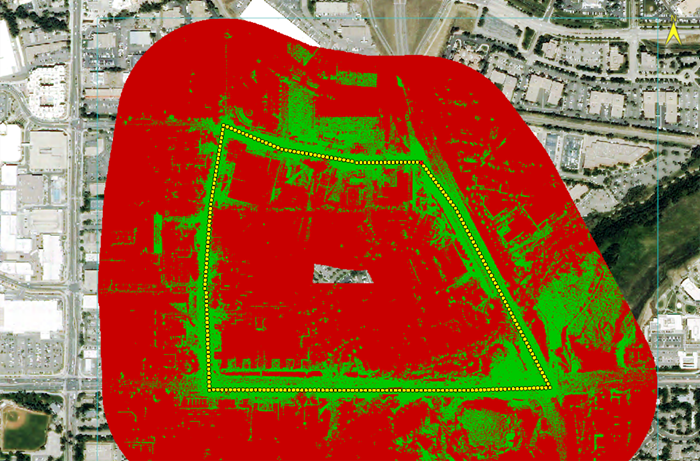
With Interactive Viewshed Analysis, observer points can be added on-the-fly as:
-
A single observer point that can be moved around the image.
-
One or more drawn paths that contain multiple observer points along the path.
-
One or more drawn areas that contain multiple observer points inside the area.
With the new Viewshed Analysis tool, the results from observer points will be immediately visible in the view, and you can animate and save the results to file. See Interactive Viewshed Analysis and Interactive Viewshed Analysis Tutorial for complete details.
New Menu and Manipulator Options
-
Link Views: A new option to quick link views has been added to the Layer Manager context menu. In addition, view linking through the main menu Views > Link Views option and the new Quick Link option has been updated to support RPC, CSM, and pseudo projections, as well as standard projection.
-
Band Animation: Band Animation from the Layer Manager context menu and the main menu Display > Band Animation option now provides two methods to choose from. You can animate by using the Xtreme Viewer, or by using the Raster Series animator.
-
Shadows Down Manipulator: This new manipulator rotates the display in the current view so that shadows are facing toward the bottom of the display. It is only available for georeferenced SAR images in SICD format.
New ENVITasks
You can use these new ENVITasks to perform data-processing operations in your own ENVI+IDL programs:
-
CalculateRelativeWaterDepth: Calculates a product depicting relative water depths for water regions from a multispectral raster with at least blue, green, and near infrared bands.
-
EmissivityFromAlphaResiduals: Produces alpha residual spectra that approximates the shape of emissivity spectra from thermal infrared radiance data.
-
EmissivityFromNormalization: Calculates the emissivity and temperature values from thermal infrared radiance data using a fixed emissivity value.
-
EmissivityFromReferenceChannel: Calculates emissivity and temperature values from thermal infrared radiance data. This method assumes that all the pixels in one band of the thermal infrared data have a constant emissivity.
-
ExportRasterToKMZ: Exports a raster and its footprint to Google Earth's KMZ (Keyhole Markup Language Zipped) format.
-
ROIToKML: Exports ENVI regions of interest (ROIs) to a Keyhole Markup Language (KML) file.
-
StringProcessing: This task performs basic string operations. For example, this task can be useful in the Modeler when working with filenames.
-
ThermalAtmosphericCorrection: Calculates the thermal infrared atmospheric correction.
NITF Updates
This release includes support for the following TREs:
-
FCRNSA NITF Tagged Record Extension
-
FRMSGA NITF Tagged Record Extension
The following performance improvements for NITF 2.1 JPEG 2000 Compressed Images are included in this release:
-
Display performance for panning and zooming has increased and is now up to 60% faster.
-
Processing speed in some cases is up to 60% faster.
ArcGIS Pro Integration
Integration with ArcGIS Pro has been added this release. If ArcGIS Pro is installed, you can send one or more open files from ENVI to ArcGIS Pro using one of the following.
-
From the Data Manager: Click the Open Selected in ArcGIS Pro button
 on the Toolbar.
 -
From Layer Manager: by right-click the layer and select Send to ArcGIS Pro.
When the data is displayed in both ENVI and ArcGIS Pro, you can set the extent to use, and link the ENVI and ArcGIS Pro views to synchronize them. See the sections Send Files to ArcGIS Pro, ArcGIS Pro Integration, and Chip to ArcGIS Pro for details.
Publish to ENVI Connect
In this version of ENVI you can upload rasters to ENVI Connect. See Upload Raster to ENVI Connect and UploadRasterToENVIConnect Task for details.
New ENVI Modeler Examples
New in this release are multiple model examples to help you learn how the ENVI Modeler works. Each example showcases different nodes and techniques that you can apply to custom-based workflows. See Getting Started with the ENVI Modeler for more details.
New Programming Routine
ENVIPseudoRasterSpatialRef::ShadowsDownAngle
The new ShadowsDownAngle method returns the rotation angle, in degrees, so that shadows are toward the bottom of the display. This option is only available for georeferenced SAR images in SICD format.
Support Removed for 32-bit ENVI
Support for running ENVI in 32-bit mode has been removed. This also includes removing support for chip and send files to ArcMap, connect and save to an ArcGIS geodatabase, chip to Print Layout view, and Map Layout view (File > Print).