What's New in ENVI 6.1
This release includes the following new and improved features.
Highlights
- Added support for data types
- Enhanced spectral subsetting
- New workflow for SAM Target Finder with BandMax
- Enhanced spectral processing in the ENVI API and Modeler
- Added spectral indices
- New Dark Mode theme
- New and updated ENVI Toolbox tools
- New and updated ENVI Tasks
- ENVI performance improvements
- NITF updates
- New ENVI Preferences
Supported Data Types
Support for the following data formats has been added in this release:
- AlSat-2B
- DigitalGlobe/Maxar Legion
- Jilin-1
- NASA PACE (Plankton, Aerosol, Cloud, Ocean Ecosystem)
- SAR data types:
- Sentinel-1 GRD
- Sentinel-1 SLC
- TerraSAR-X
- THEOS-2
- Wyvern Dragonette
- Ziyuan-1 ZY-1-02D (ZY1E)
Enhanced Spatial and Spectral Subsetting
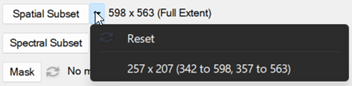
With spatial subsetting and spectral subsetting you can now apply a previous subset using one that was previously defined during the current ENVI session. ENVI remembers the subsets used during the session, and they will be available from the drop-down arrow  next to the Spatial Subset and Spectral Subset buttons, respectively.
Spatial subsetting has also been enhanced with zoom capabilities and additional stretch options that help show more detail within an area you want to subset.
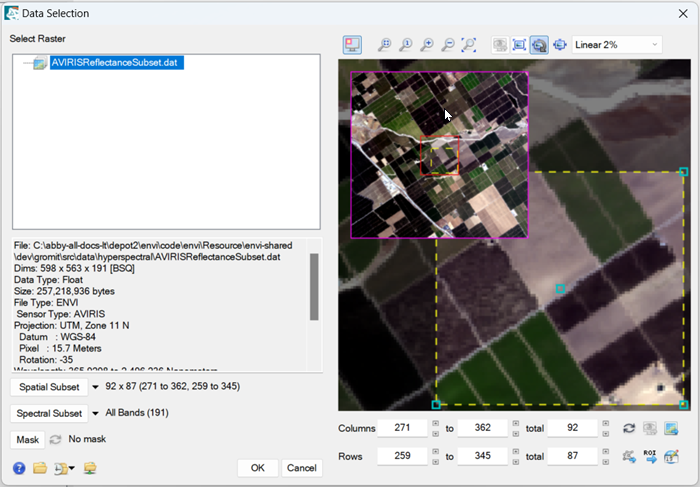
The new zoom options are as follows:
- Draw an area with the mouse zoom into
- Zoom to the full resolution of the image
- Zoom in and out by a fixed percentage
- Zoom to the full extent of the image
- Zoom in and out using the mouse wheel
In addition to selecting a stretch, you can also choose how to apply it to the image in the Spatial Subsetting panel with the following options:
- Stretch Using View from Display
- Stretch on Full Extent
- Stretch on View Extent with Auto Update
- Stretch on View Extent
See Subsets for complete details on these updates.
New SAM Target Finder with BandMax Workflow
The SAM Target Finder with BandMax Workflow has been re-engineered to use ENVITasks and a new ENVI Workflow user interface. The SAM Target Finder with BandMax Workflow finds targets in hyperspectral images using a SAM classification and (optionally) the BandMax algorithm.
The BandMax algorithm increases classification accuracy by determining an optimal subset of bands to help you separate your targets from known background materials. For details. see SAM Target Finder with BandMax Workflow.
Enhanced Spectral Processing in the ENVI API and Modeler
Updates to spectral processing in the ENVI API and Modeler include a new API class and new API methods, the ability to drag and drop spectral signatures from multiple sources, and the new EndmemberCollection task. The following are the additions to the ENVI API:
- The ENVISpectralSignature, class
- New methods:
- ENVISpectralLibrary::GetSpectralSignature (replaces ENVISpectralLibrary::GetSpectrum, which has been deprecated)
- ENVIUI::PlotSpectralSignature
- ENVIUI::SelectSpectralLibrary
- ENVIUI::SelectSpectralLibrarySignature
- ENVIUI::SelectSpectralSignature
-
The EndmemberCollection task, a “data preparation” helper.
-
The ability to drag and drop spectral signatures into the Modeler from multiple sources.
New Spectral Indices
Canopy Water Content Indices
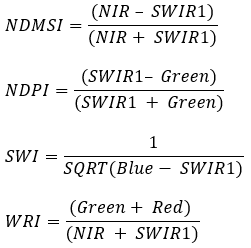
New Canopy Water Content Indices have been added for Normalized Difference Moisture, Normalized Difference Pond, Simple Water, and Water Ratio. Below are the formulas for reference:
Forest Cover Indices
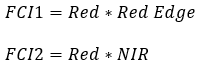
The Broadband Greenness indices Forest Cover Index 1 and Forest Cover Index 2 have been added to this release, for use with Forest Cover Classification. Below are the formulas for reference.
Methane Gas Indices
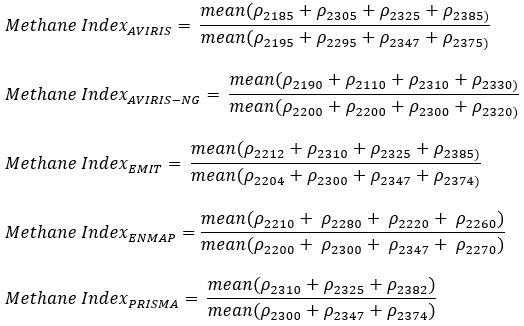
New Methane indices have been added to this release, specifically calculated for the following sensors: AVIRIS-CL, AVIRIS-NG, EMIT, ENMAP, and PRISMA. While the indices are made for these sensors, they can be used with other imagery that has comparable wavelengths. Like the old Methane Index, these work on radiance data, not reflectance data. Below are the formulas for reference:
New Dark Mode Theme
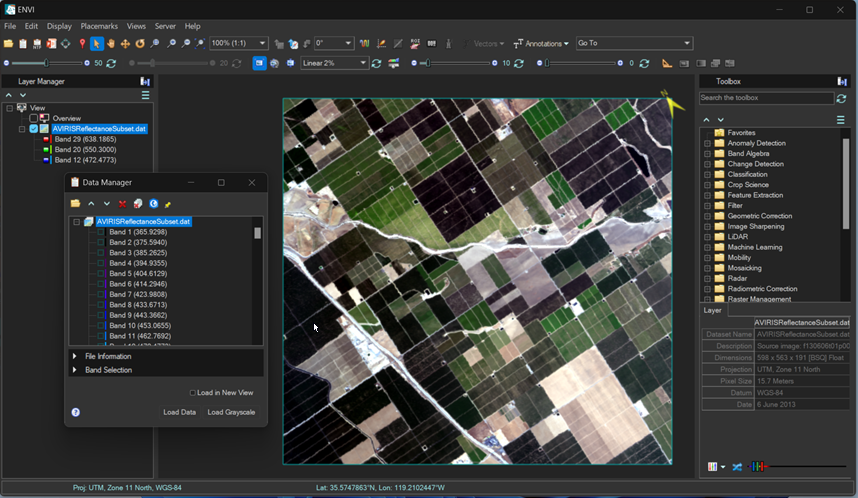
The Dark Mode option has been added to the ENVI user interface. To have the ENVI display to use Dark mode, change the Theme parameter setting in ENVI Preferences.
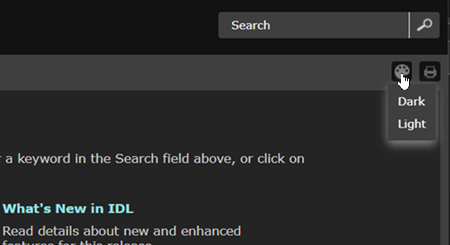
ENVI Help will default to the same theme that is set for the ENVI user interface. You can also toggle the Help display between Dark and Light modes independently from a drop-down list in the ENVI Help toolbar:
New and Updated ENVI Toolbox Tools
New tools:
These new tools are in the ENVI Toolbox under the new Mobility folder:
- Forest Cover Classification: Classifies areas of forest cover in multispectral or hyperspectral reflectance imagery, using information from red and red edge or near-infrared bands.
- Helicopter Landing Zones: Identifies locations within an elevation model that would be suitable to land a helicopter.
- Topographic Breaklines: Identifies breaklines, or breaks-in-slope, from a digital elevation model (DEM).
Updated tools:
- Empirical Line Calibration: This tool has been updated to use the EmpiricalLineCalibration task and the modern ENVI interface.
Removed tools:
-
The Transform > MNF Rotation > Forward MNF Noise Statistics from Dark Data tool has been removed from the ENVI Toolbox. It is still available in ENVI Classic.
New and Updated ENVI Tasks and Routines
You can use these new tasks to perform data-processing operations in your own ENVI+IDL programs:
- ExportRasterToJPEG2000: This task exports a raster to JPEG2000 file format.
- ExportVectorToKML: This task exports a vector to a KML (Keyhole Markup Language) or compressed KMZ (Keyhole Markup Language Zipped) file format.
- ForestCoverClassification: This task performs raster classification based on Forest Cover Index.
- HelicopterLandingZones: This task performs raster identification of helicopter landing zones.
- TopographicBreaklines: This task performs raster calculations of topographic breaklines.
Updated tasks:
- BuildBandStack and BuildLayerStack: Added the ORDER_BANDS_BY_WAVELENGTH property.
- EmpiricalLineCalibration: Removed the PATH_RADIANCE and SOLAR_IRRADIANCE properties. Added the DATA_SPECTRA and FIELD_SPECTRA properties.
- GetSpectrumFromLibrary: Added the SPECTRAL_SIGNATURE property.
- ReprojectGLT: Re-added the LATITUDE_RASTER and LONGITUDE_RASTER properties that were removed in 6.0. These properties were required in ENVI versions 5.7 and older, now they are optional.
- SubsetRaster: Added the REMOVE_BAD_BANDS keyword.
Updated routines:
- ENVILayerStackRaster and ENVIMetaspectralRaster: Added the ORDER_BANDS_BY_WAVELENGTH keyword, which will order bands by increasing wavelength value. This setting can be useful on data where wavelengths overlap between bands.
- ENVIRaster: Added the MODALITY property, which will specify the category of the raster.
- ENVISubsetRaster: Added the REMOVE_BAD_BANDS property.
- ENVIUI::SelectInputData: Removed the DATA and NO_DATA keywords. Added the MODALITY keyword, which will specify that the dialog should only display rasters whose MODALITY property matches the requested modality.
The following function method is obsolete as of this release:
- ENVISpectralLibrary::GetSpectrum is now obsolete. It has been replaced by ENVISpectralLibrary::GetSpectralSignature.
New File > Save As Options
Three new Save As options have been added to the ENVI File menu in the menu bar:
- Save As > Save Vector As KML: Exports a vector to a KML (Keyhole Markup Language) or compressed KMZ (Keyhole Markup Language Zipped) file format.
- Save As > Save Vector As: Saves an open
.shpor.evfvector file to a new filename. - Save As > Save Annotation As ANZ: Saves a new annotation layer to an
.anzfile or saves an open annotation file to a new filename.
Performance Improvements
The following performance improvements are included in this release:
Improved Performance Metrics for Generating Raster Statistics (Solid State Drive)
|
|
ENVI 6.1 (seconds) |
ENVI 6.0 (seconds) |
|---|---|---|
|
NITF Format |
|
|
|
HSI Uncompressed Big Block 1992x3402x172 BIL |
19 |
309 |
|
HSI Uncompressed Big Block 1992x3402x172 BIP |
23 |
300 |
|
J2K MSI 25648x21894x4 BSQ |
36 |
50 |
|
J2K MSI 5000x5000x8 BSQ |
170 |
418 |
|
|
|
|
|
JPEG2000 Format |
|
|
|
11728x12800x3 BSQ |
13 |
23 |
|
21600x10800x3 BSQ |
10 |
13 |
|
|
|
|
|
ENVI Format |
|
|
|
26755x26755x3 BIL |
2 |
16 |
|
26755x26755x3 BIP |
2 |
10 |
|
26755x26755x3 BSQ |
2 |
13 |
|
11587x11587x8 BIL |
2 |
15 |
|
11587x11587x8 BIP |
2 |
13 |
|
11587x11587x8 BSQ |
2 |
14 |
|
1711x4000x157 BIL |
16 |
296 |
|
1711x4000x157 BIP |
18 |
297 |
|
1711x4000x157 BSQ |
15 |
312 |
|
11242x1280x285 BIP |
14 |
430 |
|
611x3426x425 BIP |
29 |
1166 |
Improved HDF5 Read Performance
HDF5 read performance for HSI data is now 95% faster.
Improved Vector Performance
Threading has been added to the shapefile DLM in this release, which will improve the speed for opening and viewing times for vectors.
Improved WMS Resolution and Performance
- To improve resolution and performance on OGC WMS servers, a Pixel Size parameter has been added to the Remote Connection Manager dialog. Changing this value can help increase or decrease the resolution. It additionally adjusts the columns and rows, and the resolution will be modified to get a finer-grained pixel size with a much larger image.
- Threading has been added to help improve opening time.
NITF Updates
This release includes the following NITF updates:
- NITFToRasterSeries Task: Creates a raster series from one or more NITFs and an image segment to use as a baseline.
-
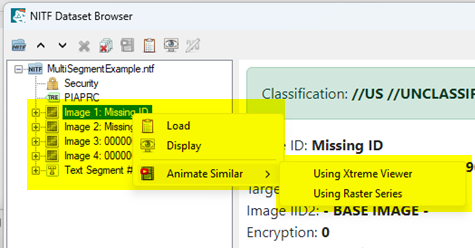
Animate Similar NITF Image Segments: A new feature in the NITF Data Browser is the ability to select a NITF image segment to use as a baseline image segment and create a series of similar image segments that can be animated. After you select the baseline image segment, you can choose to animate using the Series Manager or the Xtreme Viewer. See the topics Animate Raster Series and NITF Image Segments and Animate Using Xtreme Viewer for details.
New ENVI Preferences
The Display General preferences include the following new parameters:
- Raster Zoom on Initial Display: Sets the default zoom type to use when initially displaying a raster.
- Zoom Interpolation Method: Sets the interpolation method to use when zooming on raster layers.
- Classification Zoom Interpolation Method: Sets the interpolation method to use when zooming on classification layers.
The Application preferences include the new Theme parameter, described earlier in this topic.
See Also
See What's New (Previous ENVI Releases) for an archive of What's New information.