FilterTiePointsByPushbroomModel Task
This task uses the pushbroom model to filter the tie points. Both input images must contain an RPC spatial reference.
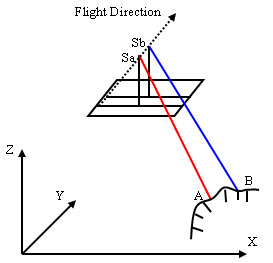
For images taken with a pushbroom sensor that have RPC information, the images of the same scene are related by epipolar geometry constraint. For a feature point in the first image, the corresponding point in the second image must lie on the epipolar line or curve. Both images must have RPCs. Imagery from pushbroom sensors use the line central projection. Each scan line has its own projection center, as the following figure shows.
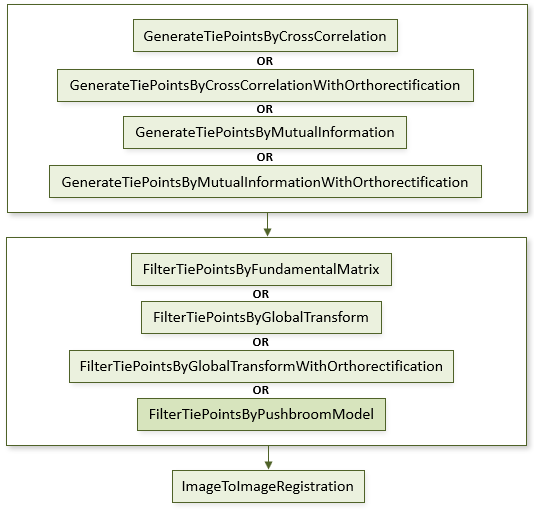
The following diagram shows where this task belongs within an image-to-image registration workflow:
References:
Jin, Xiaoying. ENVI automated image registration solutions. NV5 Geospatial Solutions, Inc. whitepaper (2017). ENVI automated image registration solutions can be downloaded from our website.
Jin, Xiaoying, and Robert Schafer. Method and system for automatic registration of images. Exelis, Inc., assignee; now owned by NV5 Global, Inc. U.S. Patent No. 9,245,201 (issued January 26, 2016).
Example
This example uses sample Quickbird images and a USGS SRTM 1-arc second DEM. The files are available from our ENVI Tutorials web page. Click the Image Registration link to download the .zip file to your machine, then unzip the files. Update the file references in the example with the correct locations.
; Start the application
e = ENVI()
; Open QuickBird images and SRTM 1-arc second DEM
file1 = 'QuickBirdPhoenixWest.dat'
raster1 = e.OpenRaster(file1)
file2 = 'QuickBirdPhoenixEast.dat'
raster2 = e.OpenRaster(file2)
DEMFile = 'PhoenixDEMSubset.dat'
DEMRaster = e.OpenRaster(DEMFile)
; Get the task from the catalog of ENVITasks
Task = ENVITask('GenerateTiePointsByCrossCorrelationWithOrthorectification')
; Define inputs
Task.INPUT_RASTER1 = raster1
Task.INPUT_RASTER2 = raster2
Task.INPUT_DEM_RASTER = DEMRaster
Task.REQUESTED_NUMBER_OF_TIEPOINTS = 40
; Run the task
Task.Execute
; Get the output tie points
TiePoints = Task.OUTPUT_TIEPOINTS
OrthoTiePoints = Task.OUTPUT_ORTHORECTIFIED_TIEPOINTS
; Get the tie point filter task from the catalog of ENVITasks
FilterTask = ENVITask('FilterTiePointsByPushbroomModel')
; Define inputs for the filtering task
FilterTask.INPUT_TIEPOINTS = TiePoints
; Run the task
FilterTask.Execute
; Define outputs for the filtering task
FilteredTiePoints = FilterTask.OUTPUT_TIEPOINTS
; Get the image-to-image registration task
RegTask = ENVITask('ImageToImageRegistration')
; Define inputs
RegTask.INPUT_TIEPOINTS = FilteredTiePoints
RegTask.WARPING = 'Triangulation'
; Run the image-to-image registration task
RegTask.Execute
; Get the output raster
WarpedRaster = RegTask.OUTPUT_RASTER
; Get the collection of data objects currently available in the Data Manager
DataColl = e.Data
; Add the output to the Data Manager
DataColl.Add, WarpedRaster
; Display the result
View = e.GetView()
Layer = View.CreateLayer(WarpedRaster)
Syntax
Result = ENVITask('FilterTiePointsByPushbroomModel')
Input parameters (Set, Get): INPUT_TIEPOINTS, OUTPUT_TIEPOINTS_URI, REPROJECTION_ERROR_THRESHOLD
Output parameters (Get only): OUTPUT_TIEPOINTS
Parameters marked as "Set" are those that you can set to specific values. You can also retrieve their current values any time. Parameters marked as "Get" are those whose values you can retrieve but not set.
Input Parameters
OUTPUT_TIEPOINTS_URI (optional)
Specify a string with the fully qualified path and filename for OUTPUT_TIEPOINTS.
REPROJECTION_ERROR_THRESHOLD (optional)
Specify the reprojection error threshold to use. Specify the reprojection error threshold to use. It is defined as the perpendicular distance (in pixel units) of a point in one image from its corresponding epipolar line computed from a point in another image. The default value is 10.0.
Output Parameters
OUTPUT_TIEPOINTS
This is a reference to an ENVITiePointSet object with the output tie points.
Methods
Properties
INPUT_TIEPOINTS (optional)
This is a reference to the ENVITiePointSet object generated from the GenerateTiePointsByCrossCorrelation or GenerateTiePointsByMutualInformation task.
Version History
|
ENVI 5.2.1 |
Introduced |
See Also
ENVITask, FilterTiePointsByFundamentalMatrix Task, FilterTiePointsByGlobalTransform Task, GenerateTiePointsByCrossCorrelation Task, GenerateTiePointsByMutualInformation Task, ImageToImageRegistration Task, ENVITiePointSet