FilterTiePointsByGlobalTransform Task
This task uses the global transform to filter tie points. For orthorectified images, nadir, or near-nadir images, the transformation model between the first and second image fits an RST transform. When the scene is rather flat and the sensor is very far from the scene, the transformation model between the two images fits a first-order polynomial transform. Global transform is the most common filtering method.
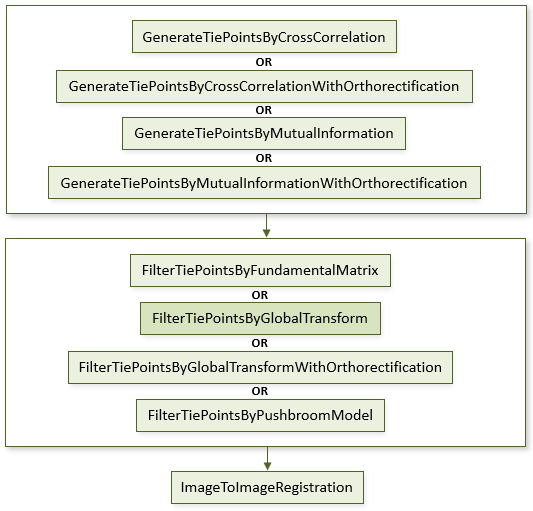
The following diagram shows where this task belongs within an image-to-image registration workflow:
References:
Jin, Xiaoying. ENVI automated image registration solutions. NV5 Geospatial Solutions, Inc. whitepaper (2017). ENVI automated image registration solutions can be downloaded from our website.
Jin, Xiaoying, and Robert Schafer. Method and system for automatic registration of images. Exelis, Inc., assignee; now owned by NV5 Global, Inc. U.S. Patent No. 9,245,201 (issued January 26, 2016).
Example
This example uses sample images from the Image Registration tutorial. The files are available from our ENVI Tutorials web page. Click the Image Registration link to download the .zip file to your machine, then unzip the files. Update the file references in the example with the correct locations.
; Start the application
e = ENVI()
; Open input rasters
File1 = 'quickbird_2.4m.dat'
File2 = 'ikonos_4.0m.dat'
Raster1 = e.OpenRaster(File1)
Raster2 = e.OpenRaster(File2)
; Get the auto tie point generation task from the catalog of ENVITasks
Task = ENVITask('GenerateTiePointsByCrossCorrelation')
; Define inputs
Task.INPUT_RASTER1 = Raster1
Task.INPUT_RASTER2 = Raster2
; Run the task
Task.Execute
; Get the output tie points
TiePoints = Task.OUTPUT_TIEPOINTS
; Get the tie point filter task from the catalog of ENVITasks
FilterTask = ENVITask('FilterTiePointsByGlobalTransform')
; Define inputs
FilterTask.INPUT_TIEPOINTS = TiePoints
; Run the task
FilterTask.Execute
; Get the output tie points
TiePoints2 = FilterTask.OUTPUT_TIEPOINTS
; Get the image-to-image registration task from the catalog of ENVITasks
RegistrationTask = ENVITask('ImageToImageRegistration')
; Define inputs
RegistrationTask.INPUT_TIEPOINTS = TiePoints2
RegistrationTask.WARPING = 'Triangulation'
; Run the task
RegistrationTask.Execute
; Get the output raster
WarpedRaster = RegistrationTask.OUTPUT_RASTER
; Get the collection of data objects currently available in the Data Manager
DataColl = e.Data
; Add the output to the Data Manager
DataColl.Add, WarpedRaster
; Display the input rasters
View = e.GetView()
Layer1 = View.CreateLayer(Raster1)
Layer2 = View.CreateLayer(Raster2)
; Display the result
Layer3 = View.CreateLayer(WarpedRaster)
Syntax
Result = ENVITask('FilterTiePointsByGlobalTransform')
Input parameters (Set, Get): ERROR_THRESHOLD, FITTING_TRANSFORM, INPUT_TIEPOINTS, OUTPUT_TIEPOINTS_URI
Output parameters (Get only): OUTPUT_TIEPOINTS
Parameters marked as "Set" are those that you can set to specific values. You can also retrieve their current values any time. Parameters marked as "Get" are those whose values you can retrieve but not set.
Input Parameters
ERROR_THRESHOLD (optional)
Specify the maximum error to allow for each tie point. The tie point with the largest error distance from the predicted location is iteratively removed until no tie points have an error greater than the this value. Multiview images of a 3D scene contain local geometric differences due to variation in local terrain relief and difference in imaging view angle. If image misalignment is mainly due to local geometric differences, increase this value.
The default value is 5.0. A higher value keeps more tie points with larger fitting errors. If you prefer to keep most tie points, enter a high value, such as 100.
FITTING_TRANSFORM (optional)
Specify the transform to use when automatically filtering tie points. The default is First-Order Polynomial.
First-Order Polynomial: A first-order polynomial warp includes an XY interaction term to account for image shear.RST: Rotation, scaling, and translation; this is the simplest method. It does not allow for shearing in the image warp.
INPUT_TIEPOINTS (required)
This is a reference to the ENVITiePointSet object generated from the GenerateTiePointsByCrossCorrelation or GenerateTiePointsByMutualInformation task.
OUTPUT_TIEPOINTS_URI (optional)
Specify a string with the fully qualified path and filename for OUTPUT_TIEPOINTS.
Output Parameters
OUTPUT_TIEPOINTS
This is a reference to an ENVITiePointSet object with the output tie points.
Methods
Properties
Version History
|
ENVI 5.2.1 |
Introduced |
See Also
ENVITask, FilterTiePointsByFundamentalMatrix Task, FilterTiePointsByPushbroomModel Task, GenerateTiePointsByCrossCorrelation Task, GenerateTiePointsByMutualInformation Task, ImageToImageRegistration Task, ENVITiePointSet