ExportRastersToDirectory Task
This task exports multiple rasters to a specified directory on disk. It can be used, for example, as part of a sequence for dicing rasters:
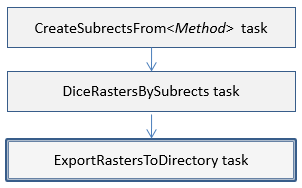
Consider using one of the following to perform these steps in one task:
Example
; Start the application
e = ENVI()
; Open an input file
File = Filepath('qb_boulder_msi', Subdir=['data'], $
Root_Dir=e.Root_Dir)
Raster = e.OpenRaster(File)
; Create some subrects
SubrectTask = ENVITask('CreateSubrectsFromTileCount')
; Define inputs
SubrectTask.NUMBER_OF_X_TILES = 3
SubrectTask.NUMBER_OF_Y_TILES = 4
SubrectTask.NCOLUMNS = Raster.NCOLUMNS
SubrectTask.NROWS = Raster.NROWS
; Run the task
SubrectTask.Execute
; Get the resulting subrects
Subrects = SubrectTask.SUBRECTS
; Get a list of names that will be used to denote the subrect areas
SubNames = SubrectTask.SUBRECT_NAMES
; Get the primary task from the catalog of ENVITasks
DiceTask = ENVITask('DiceRasterBySubrects')
; Define inputs
DiceTask.INPUT_RASTER = Raster
DiceTask.SUBRECT_ARRAY = Subrects
DiceTask.SUBRECT_NAMES = SubNames
; Run the task
DiceTask.Execute
; Get the primary task from the catalog of ENVITasks
Task = ENVITask('ExportRastersToDirectory')
; Define inputs
Task.INPUT_RASTERS = DiceTask.OUTPUT_RASTER
Task.OUTPUT_DIRECTORY = Filepath('', /TMP)
; Run the task
Task.Execute
Syntax
Result = ENVITask('ExportRastersToDirectory')
Input parameters (Set, Get): DATA_IGNORE_VALUE, INPUT_RASTERS, INTERLEAVE, OUTPUT_DIRECTORY
Output parameters (Get only): OUTPUT_RASTERS
Parameters marked as "Set" are those that you can set to specific values. You can also retrieve their current values any time. Parameters marked as "Get" are those whose values you can retrieve but not set.
Input Parameters
DATA_IGNORE_VALUE (optional)
Specify a unique data value for pixels in the output raster that have a non-zero pixel state value. See Raster Pixel State for more information.
INPUT_RASTERS (required)
Specify the rasters to export.
INTERLEAVE (optional)
Specify a string indicating the data interleave of the output raster. If this parameter is not set, the interleave of the input raster will be used. The choices are:
BSQ
BIL
BIP
OUTPUT_DIRECTORY
Specify the output directory. If you do not set this parameter, the directory will set to the ENVI output directory.
Output Parameters
OUTPUT_RASTERS
This is a reference to the output rasters of filetype ENVI.
Methods
Properties
Version History
|
ENVI 5.4.2 |
Introduced |
See Also
ENVITask, ENVISubsetRaster, CreateSubrectsFromDistance Task, CreateSubrectsFromPixels Task, CreateSubrectsFromTileCount Task, CreateSubrectsFromVector Task, DiceRasterByDistance Task, DiceRasterByPixel Task, DiceRasterBySubrects Task, DiceRasterByTileCount Task, DiceRasterByVector Task, Masking Support in ENVITasks