DiceRasterByPixel Task
This task separates a raster into tiles based on number of pixels in the X and Y directions. In most cases the tiles in the last row and column will be smaller than the specified distance, as the following example shows:
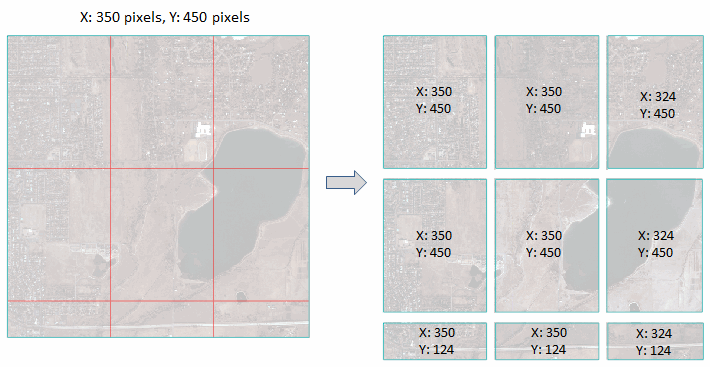
Example
; Start the application
e = ENVI()
; Open an input file
File = Filepath('qb_boulder_msi', Subdir=['data'], $
Root_Dir=e.Root_Dir)
Raster = e.OpenRaster(File)
; Get the task from the catalog of ENVITasks
Task = ENVITask('DiceRasterByPixel')
; Define inputs
Task.INPUT_RASTER = Raster
Task.NUMBER_OF_X_PIXELS = 350
Task.NUMBER_OF_Y_PIXELS = 450
Task.TILE_GRID_VECTORS = 'true'
; Define the output directory
Task.OUTPUT_DIRECTORY = Filepath('', /TMP)
; Run the task
Task.Execute
; Get the collection of data objects currently in the Data Manager
DataColl = e.Data
; Add the output to the Data Manager
DataColl.Add, Task.OUTPUT_RASTER
; Display the results
View1 = e.GetView()
FOR i=0,N_Elements(Task.Output_Raster)-1 DO $
Layer = View1.CreateLayer(Task.OUTPUT_RASTER[i])
vectorLayer = View1.CreateLayer(Task.OUTPUT_VECTOR)
View1.Zoom, /FULL_EXTENT
Syntax
Result = ENVITask('DiceRasterByPixel')
Input parameters (Set, Get): INPUT_RASTER, NUMBER_OF_X_PIXELS, NUMBER_OF_Y_PIXELS, OUTPUT_DIRECTORY, TILE_GRID_VECTORS
Output parameters (Get only): OUTPUT_RASTER, OUTPUT_VECTOR
Parameters marked as "Set" are those that you can set to specific values. You can also retrieve their current values any time. Parameters marked as "Get" are those whose values you can retrieve but not set.
Input Parameters
INPUT_RASTER (required)
Specify the input raster.
NUMBER_OF_X_PIXELS (required)
Specify the number of pixels per tile in the X direction.
NUMBER_OF_Y_PIXELS (required)
Specify the number of pixels per tile in the Y direction.
OUTPUT_DIRECTORY (optional)
Specify the output directory for the tiles. If set to an asterisk (*), the output rasters will be virtual. This will not be written to disk, and the directory will not be created. If you do not set this parameter, the tiles will save to the directory indicated by the ENVI Output Directory preference.
TILE_GRID_VECTORS (optional)
Set this parameter to true to create an output shapefile that shows the tile boundaries.
Output Parameters
OUTPUT_RASTER
This parameter contains an array of output rasters. Their filenames contain the root name of the input raster with the row/column index appended in the form of RxCx. For example, R2C3 means row 2 and column 3.
OUTPUT_VECTOR
This parameter contains the output shapefile if you set the TILE_GRID_VECTORS parameter to true.
Methods
Properties
Version History
|
ENVI 5.4 |
Introduced |
|
ENVI 5.5 |
OUTPUT_DIRECTORY now supports '*', which allows OUTPUT_RASTER to be virtual output. |
See Also
ENVITask, ENVITask::Parameter, ENVISubsetRaster, CreateSubrectsFromDistance Task, CreateSubrectsFromPixels Task, CreateSubrectsFromTileCount Task, CreateSubrectsFromVector Task, DiceRasterByDistance Task, DiceRasterBySubrects Task, DiceRasterByTileCount Task, DiceRasterByVector Task, ExportRastersToDirectory Task