|
<< Click to Display Table of Contents >> XML Modeling Project file |
  
|
|
<< Click to Display Table of Contents >> XML Modeling Project file |
|
Aim of the XML Project file is to store information about input/output dataset, sources and processing options. This allows for an easy retrieval of a modeling session and the possibility of getting datasets and sources from other XML projects.
The XML Project File
The XML Project File is an ASCII file in XML format used to store the input configuration and output results of Non-Linear Inversion, Linear Inversion, Forward Modeling and CFF calculation.
In the XML project file, everything can be saved to and restored to easily reload a modeling session, rerun the processing or inspect the results. Moreover, sources and datasets from other XML project files can be easily recovered and imported to new XML files, to quickly initialize new processing exploiting previous tests already done. Another useful advantage of the XML project file is the possibility of sharing it with other users, to let them open it and see the results.
The only limitation is that while source parameters are all written in the XML file, datasets (InSAR and GPS) are linked to their shapefile; this is to avoid the XML project file to get excessively big. Therefore sharing an XML project file allow to see the results, to check the input/output sources, but not rerun the processing, unless the original datasets (InSAR and/or GPS shapefiles) are sent along the XML project file.
The XML file is arranged as a tree, starting from a general root tag, subdivided into four brunches corresponding to the above mentioned procedures (Figure 1).
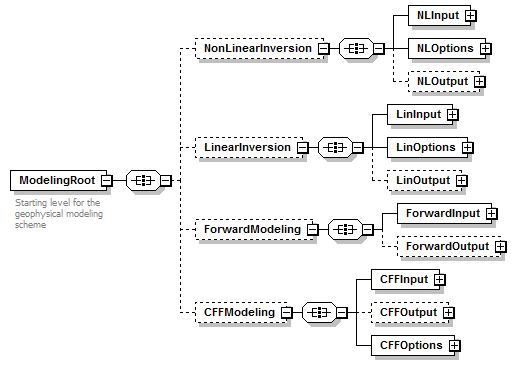
Figure 1 – First two levels of the XML project file
The XML Modeling Project file should not be manually modified and its structure is not documented. A manual editing would result in unpredictable errors and/or wrong results. However, since expert users might find the text editing faster than using of graphic interfaces, tags in the XML file have been created with self-explaining names. In this case, the use of an XML editor to preserve the syntax integrity is strongly suggested.
The four main sections of the XML Project File support the Non-Linear Inversion, Linear Inversion, Forward Modeling and CFF Stress Transfer panels. Setting the XML Project File for these panels is mandatory and the first step is always opening and existing XML file or creating a new one. For panels where a processing creates new folders (Non-Linear Inversion, Linear Inversion and CFF Stress Transfer) the output folders are canceled when the user edits any input parameter.
About the source retrieval. A typical use of the XML Project File is the possibility of retrieve any source stored in the existing sections. An example is when a new InSAR or GPS dataset is available and the user want to run again an inversion by adding this dataset to the one already processed. After creating a new XML file, lot of time can be saved by importing the sources parameters from the previous XML project file (in the 'INPUT sources' folder, 'ADD SOURCE - Import - From XML project file...').
Importing from XML project files can be done with sources, datasets and orbital parameters. In all the cases, the button open a simple interface, through which the user can navigate an XML project file to find the wanted resource. From a pull down menu, the user can access the following XML sections:
•Non-Linear Inversion - Output, containing all the sources, datasets and orbital contributions (offset, ramp or quadratic surface) generated after the Non-Linear Inversion;
•Linear Inversion - Input, containing all the sources, datasets and orbital contributions set as input for the Linear Inversion;
•Linear Inversion - Output, containing all the sources, datasets and orbital contributions generated after the Linear Inversion;
•Forward Modeling, containing all the sources, datasets and orbital contributions set to run the Forward Modeling;
•CFF Calculation - Input, containing all the sources set as input for the CFF Stress Transfer;
•CFF Calculation - Receiver, containing all the sources set as receiver for the CFF Stress Transfer;
•CFF Calculation - Output, containing all the sources after the CFF calculation in the CFF Stress Transfer;
Since sources and datasets can be transferred between different XML sections (a typical case is loading the INPUT sources of a Linear Inversion with the output of a Non-Linear inversion), section dependent parameters could need to be fixed. In this case the "***CHECK PARAMETERS***" string is added to the resource name.
Specific Function(s)
XML section
Select the XML Project File section to navigate through the sections (see the Technical Note).
General Functions
Commit
Add the selected source(s), dataset or orbital contribution (offset, ramp, quadratic surface) to the processing panel.
Cancel
The window will be closed.
Help
Specific help document section