|
<< Click to Display Table of Contents >> Focusing - Generic Focusing |
  
|
|
<< Click to Display Table of Contents >> Focusing - Generic Focusing |
|
Purpose
SAR RAW data (level 0 product) must be focused to generate Single Look Complex (SLC) data, which can be used as input in any other SARscape module.
This functionality is intended for those raw products, which are different from the standard ones supported in the previous (i.e. sensor specific) focusing routines.
Technical Note
The input data must be provided in the SARscape specific format, which is described here below.
The binary file must have the following structure:
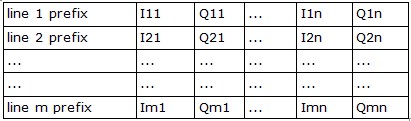
where Ilc (l and c standing respectively for line and column) is the unsigned byte Real part of a pixel; Qlc is the unsigned byte Imaginary part of a pixel; n is the number of pixels in range (columns); m is the number of pixels in azimuth (lines).
For each line, the prefix is:

Where rp is the line prefix length (in bytes), as annotated in the "RowPrefix" field of the associated .sml file (xml format); nu corresponds to those bytes, which are not used; lcp (l and c standing respectively for line and column) is the position inside the line prefix of the Line Counter, as annotated in the in the "LineCounterFirstBytePos" field of the .sml file.
The Line Counter is stored, as unsigned long integer, with MSBF byte order:
lc1 = most significant byte of line counter
lc2 = second significant byte of line counter
lc3 = third significant byte of line counter
lc4 = less significant byte of line counter
Input Files
Input file
Input raw data. This file is mandatory.
Parameters - Principal Parameters
None.
Parameters - Global
It brings to the general section of the Preferences parameters. Any modified value will be used and stored for further processing sessions.
Parameters - Other Parameters
It brings to the general section of the Preferences parameters. Any modified value will be used and stored for further processing sessions.
Output Files
Output file
Output Single Look Complex data. This file is mandatory.
_slc
Single Look Complex data and corresponding header files (.sml, .hdr).
_par.sml
Xml file containing temporary processing parameters.
Details specific to the Units of Measure and Nomenclature of the output products can be found in the Data Format section.
General Functions
Exec
The processing step is executed.
Store Batch
The processing step is stored in the batch list. The Batch Browser button allows to load the batch processing list.
Close
The window will be closed.
Help
Specific help document section.
Specific Function(s)
None.
Task, SARscapeBatch object, SARscapeBatch script example
References None.