MirrorRaster Task
This task constructs an ENVIRaster from a source raster that is reflected (flipped) horizontally, vertically, or both.
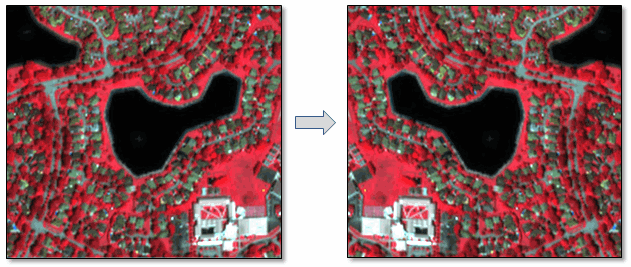
The virtual raster associated with this task is ENVIMirrorRaster.
Example
; Start the application
e = ENVI()
; Open an input file
File = Filepath('qb_boulder_msi', Subdir=['data'], $
Root_Dir=e.Root_Dir)
Raster = e.OpenRaster(File)
; Get the task from the catalog of ENVITasks
Task = ENVITask('MirrorRaster')
; Define inputs
Task.INPUT_RASTER = Raster
Task.HORIZONTAL = 'true'
; Run the task
Task.Execute
; Get the collection of objects currently in the Data Manager
DataColl = e.Data
; Add the output to the Data Manager
DataColl.Add, Task.OUTPUT_RASTER
; Display the result
View = e.GetView()
Layer = View.CreateLayer(Task.OUTPUT_RASTER)
Syntax
Result = ENVITask('MirrorRaster')
Input parameters (Set, Get): HORIZONTAL, INPUT_RASTER, OUTPUT_RASTER_URI, VERTICAL
Output parameters (Get only): OUTPUT_RASTER
Parameters marked as "Set" are those that you can set to specific values. You can also retrieve their current values any time. Parameters marked as "Get" are those whose values you can retrieve but not set.
Input Parameters
Set this parameter to flip the raster horizontally. The options are true or false (default).
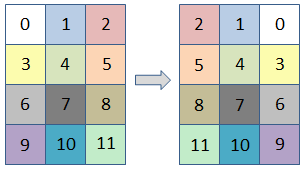
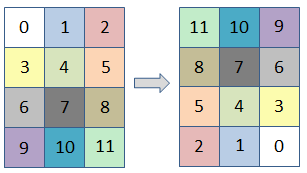
If you specify both the VERTICAL and HORIZONTAL parameters, the image is flipped in both directions:
INPUT_RASTER (required)
Specify an input raster to process.
OUTPUT_RASTER_URI (optional)
Specify a string with the fully qualified filename and path to export the associated OUTPUT_RASTER.
- If you set this parameter to an asterisk symbol (*), the output raster will be virtual and not written to disk.
- If you do not specify this parameter, or set it to an exclamation symbol (!), a temporary file will be created.
- If you set it to the hash symbol (#), ENVI creates a file in the temporary directory, but this file will not be deleted when ENVI closes.
VERTICAL (optional)
Set this parameter to flip the raster vertically. The options are true or false (default).
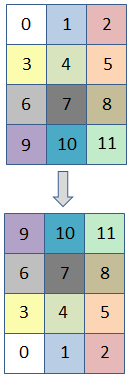
If you specify both the VERTICAL and HORIZONTAL parameters, the image is flipped in both directions:
Output Parameters
OUTPUT_RASTER
This is a reference to the output raster of filetype ENVI.
Methods
Properties
Version History
|
ENVI 5.4 |
Introduced |
|
ENVI 5.5 |
OUTPUT_RASTER_URI now supports '*', which allows OUTPUT_RASTER to be virtual output. |
See Also
ENVITask, ENVIMirrorRaster, ENVITransposeRaster, TransposeRaster Task, Masking Support in ENVITasks