LabelRegions Task
This task separates an image into regions, which are groups of contiguous pixels that share the same value. It consecutively labels all of the regions with a unique index. This task typically accepts classification images or binary masks as input.
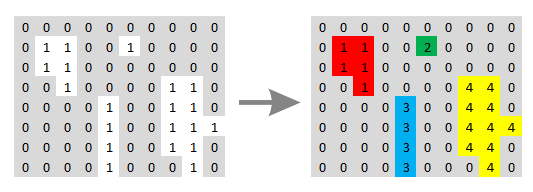
The following diagram shows how distinct regions (with a pixel value of 1) are assigned different labels. The colors are meant for illustration only, to show the different labels assigned to each region.
Example
This example identifies water pixels in a multispectral image and labels each region separately. It uses a color slice classification to color the individual regions.
; Start the application
e = ENVI()
; Open an input file
File = Filepath('qb_boulder_msi', Subdir=['data'], $
Root_Dir=e.Root_Dir)
Raster = e.OpenRaster(File)
; Create a spatial subset
SubsetTask = ENVITask('SubsetRaster')
SubsetTask.INPUT_RASTER = Raster
SubsetTask.SUB_RECT = [256,253,1023,941]
SubsetTask.Execute
; Get the water pixels
MathTask = ENVITask('PixelwiseBandMathRaster')
MathTask.INPUT_RASTER = SubsetTask.OUTPUT_RASTER
MathTask.EXPRESSION = 'b3 le 180'
MathTask.Execute
; Apply a binary morphological filter
FilterTask = ENVITask('BinaryMorphologicalFilter')
FilterTask.INPUT_RASTER = MathTask.OUTPUT_RASTER
FilterTask.METHOD = 'Open'
FilterTask.KERNEL = [[!true,!true,!true], $
[!true,!true,!true], [!true,!true,!true]]
FilterTask.ITERATIONS = 1
FilterTask.Execute
; Label the regions
LabelTask = ENVITask('LabelRegions')
LabelTask.INPUT_RASTER = FilterTask.OUTPUT_RASTER
LabelTask.Execute
; Run color slice classification
ColorTask = ENVITask('ColorSliceClassification')
ColorTask.INPUT_RASTER = LabelTask.OUTPUT_RASTER
ColorTask.Execute
; Get the collection of data objects currently
; available in the Data Manager
DataColl = e.Data
; Add the output to the data manager
DataColl.Add, ColorTask.OUTPUT_RASTER
; Display the result
View = e.GetView()
Layer = View.CreateLayer(ColorTask.OUTPUT_RASTER)
Syntax
Result = ENVITask('LabelRegions')
Input parameters (Set, Get): INPUT_RASTER, OUTPUT_RASTER_URI
Output parameters (Get only): OUTPUT_RASTER
Parameters marked as "Set" are those that you can set to specific values. You can also retrieve their current values any time. Parameters marked as "Get" are those whose values you can retrieve but not set.
Input Parameters
INPUT_RASTER (required)
Specify a single-band raster.
OUTPUT_RASTER_URI (optional)
Specify a string with the fully qualified filename and path of the associated OUTPUT_RASTER.
- If you do not specify this parameter, or set it to an exclamation symbol (!), ENVI creates a temporary file.
- If you set it to the hash symbol (#), ENVI creates a file in the temporary directory, but this file will not be deleted when ENVI closes.
Output Parameters
OUTPUT_RASTER
This is a reference to the output raster of filetype ENVI.
Methods
Properties
Version History
|
ENVI 5.5 |
Introduced |