|
<< Click to Display Table of Contents >> Coherence Matrix Viewer |
  
|
|
<< Click to Display Table of Contents >> Coherence Matrix Viewer |
|
Purpose
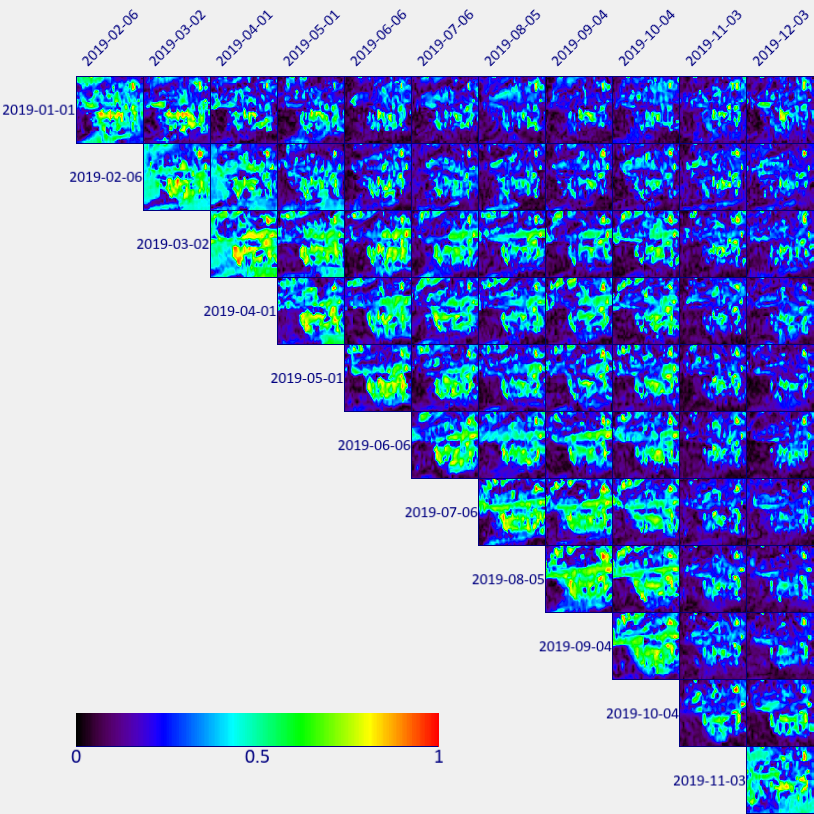
This tool is intended to represent the coherence images in a matrix format where the row and columns represent the dates considered fort the coherence computation.
It is typically used to analyze the coherence behavior in time series, i.e. Target Detection or growing season for crop monitoring.
The meta file has to be created using the CCD Time Line Workflow (using the ''Temporal Decorrelation Matrix'' option) or the Multitemporal Coherence tool (to generate geocoded coherence the Geocoding and Calibration tool must be used).
Technical Note
The graphic representation can be created as follows:
1.Open a coherence meta file in the ENVI view.
2.Launch the "Coherence Matrix Viewer" tool.
3.Click on the image, red corner of a box centered in the cursor will appear; the Coherence matrix will be computed for the area within the red box.
4.Click on Option to modify the appearance of the Coherence Matrix.
5.Click on Export to save in the proper format.
Options
Change Color Table: to set the color scale
Grid Lines off/on: to switch off/on the grid lines among the matrices
Grid Lines Color: to set the color of the grid lines
Label off/on: to switch off/on the labels that show the dates
Labels Color: to set the label color
Image per Row on: it activates a bar that allows setting the number of matrices in the view. The lower the number of matrices the higher the box that shows the area.
Export
Image: to export the image as shown in the view in .png, .jpg, .jpeg, .tif, .tiff, .gif, .bmp format
Image Full Matrix: to export the full coherence matrix and the corresponding color scale as an image in .png, .jpg, .jpeg, .tif, .tiff, .gif, .bmp format
PDF: to export the the image as shown in the view in pdf format
PostScript:
Copy: to copy the image in a file
Print: to print the image as shown in the view
PowerPoint: to save the image in a ppt slide.